Email a confidential PDF with a password, and send the password another way
Open the PDF in PDF Stitch, open More ways to export (the arrow next to Download), choose Download with a password, type a password twice and press Download. Email the file, then give the password another way: by phone, by text message or in person, never in the same email or a second one.
See it for yourself: one payslip, with and without a password
Both files are the same made-up payslip. The first is as it was saved. The second was downloaded from PDF Stitch with Download with a password. Download both, and open them in the program you read PDFs with.
The payslip as it is
A made-up payslip, saved as it is. Anyone the file reaches can open it and read every line.
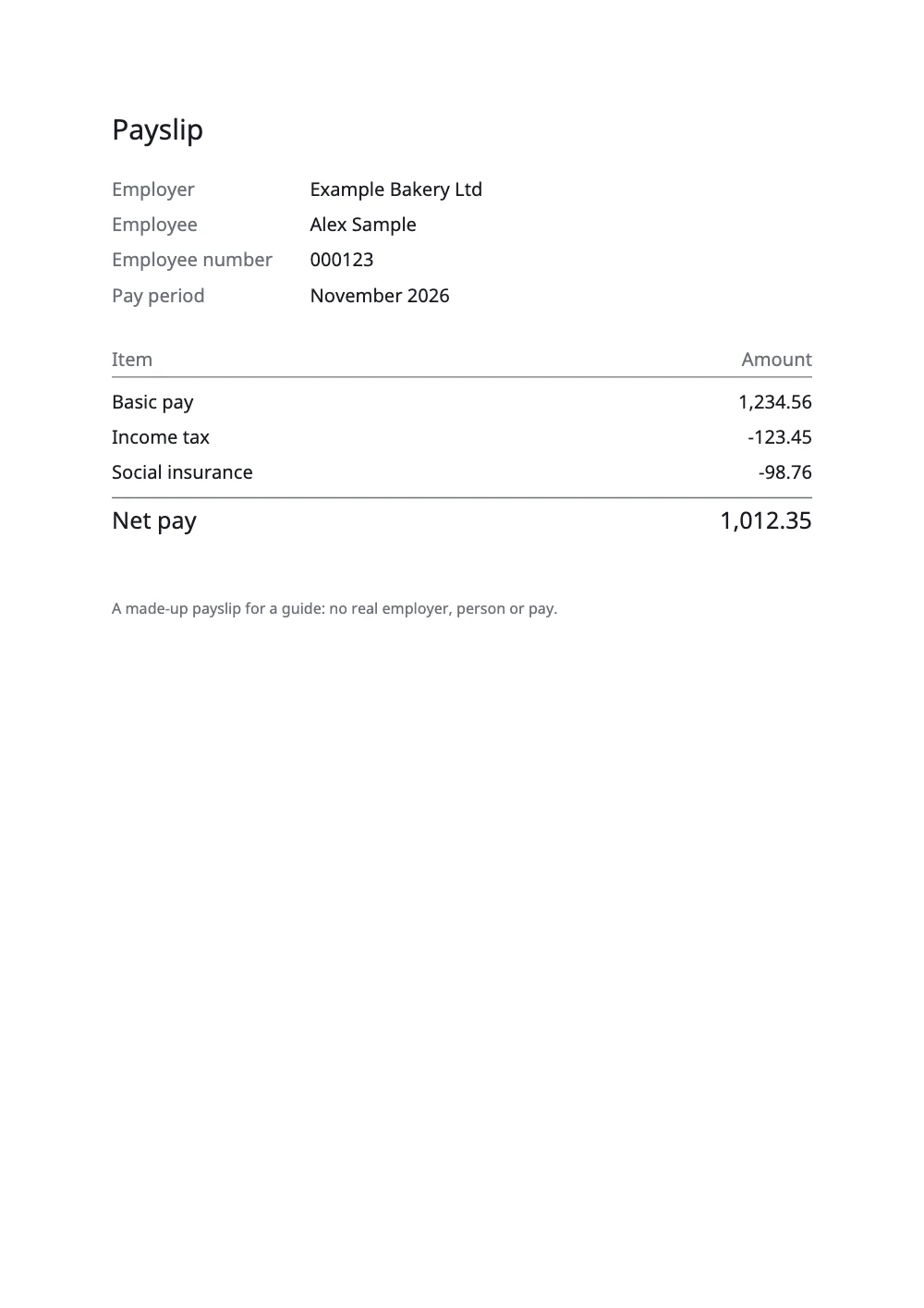
Try it: drag across the words on the page, or select all its text, then copy it. What you can copy is what the file holds.
The text in "The payslip as it is"
Payslip
Employer Example Bakery Ltd
Employee Alex Sample
Employee number 000123
Pay period November 2026
Item Amount
Basic pay 1,234.56
Income tax -123.45
Social insurance -98.76
Net pay 1,012.35
A made-up payslip for a guide: no real employer, person or pay.
Downloaded with a password
The same payslip after Download with a password in PDF Stitch, shown here as it opens with its password, which for this sample alone is copper-meadow-violin. Without it, nothing in the file can be read.
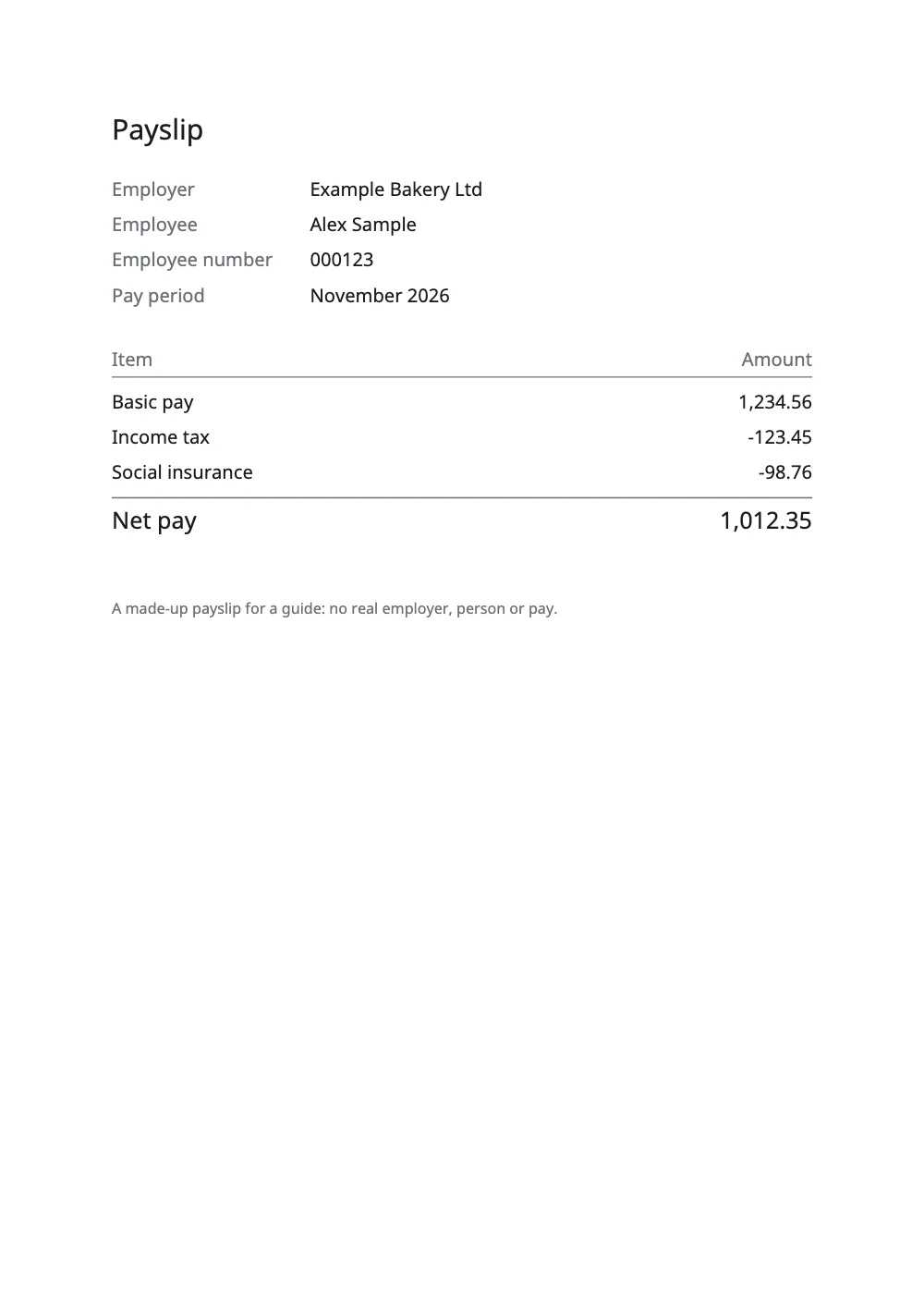
Try it: drag across the words on the page, or select all its text, then copy it. What you can copy is what the file holds.
The text in "Downloaded with a password"
This file opens only with its password: without it, no page and no text can be read.
- The first opens at once. Whoever it reaches can read the name and the pay: someone at a mistyped address, anyone who can open the mailbox, or whoever the email is forwarded to.
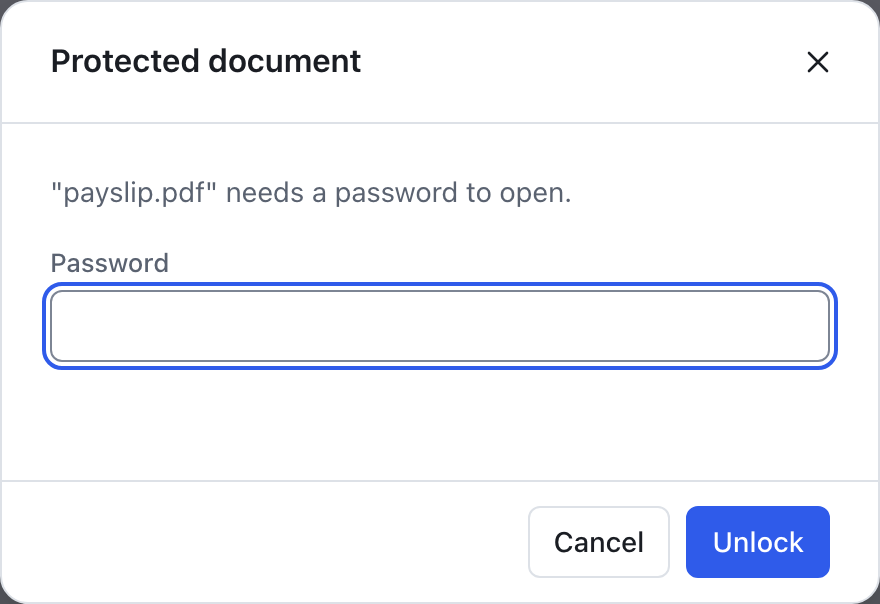
- The second asks for a password before it shows anything. Type copper-meadow-violin. That is this sample's password, written here only because the file is a sample: never write a real file's password anywhere the file goes.
- Open the second in PDF Stitch as well: it asks for the password too, and opens the payslip once it is typed.
How to put a password on a PDF
PDF Stitch runs in your browser. The file is encrypted there and is not uploaded, and the password is not sent anywhere.
- Open your PDF in PDF Stitch.
- Open More ways to export (the arrow next to Download) and choose Download with a password.
- Type the password under Password, type it again under Repeat password, and press Download.
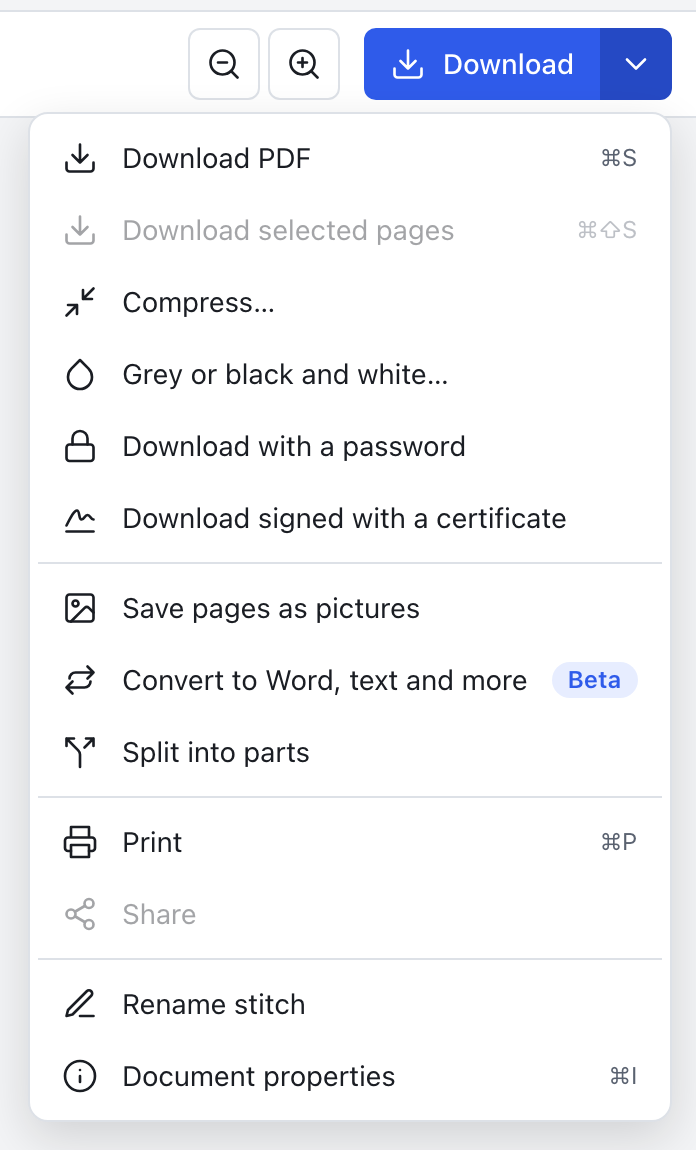
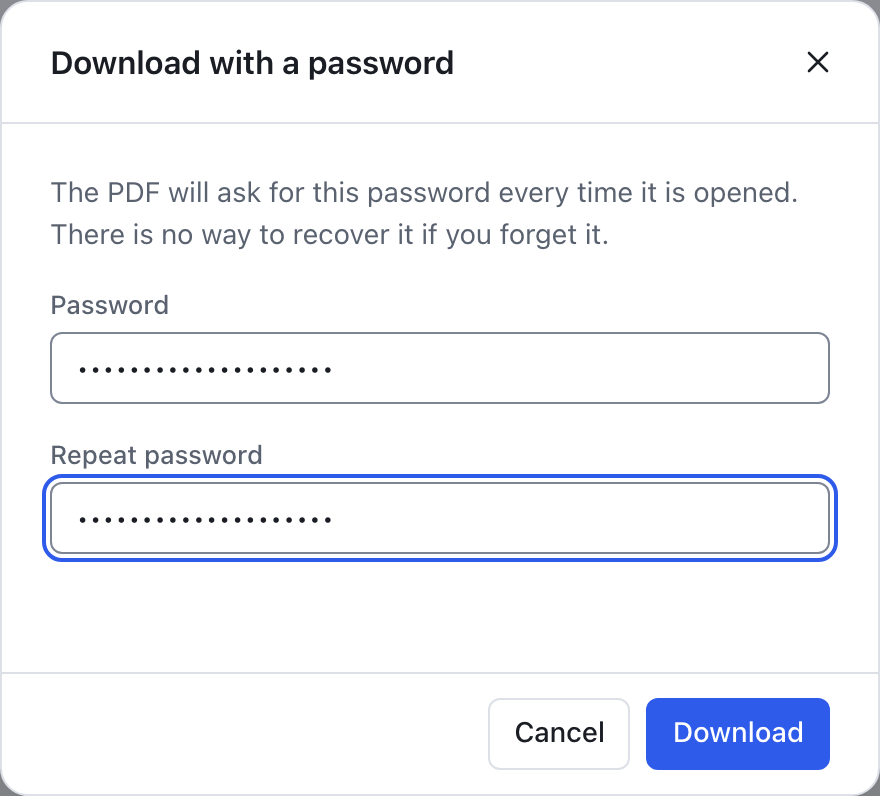
What you download is a new copy, encrypted with AES-256, that opens only with the password. Once it is open, nothing in it is restricted: it can be read, printed and copied from, unless the file you started from limited that and you chose to keep its limits. The file you started from is not changed.
Before you send it, add the downloaded file to PDF Stitch, or open it in the program you read PDFs with. It should ask for the password, and open with it.
Name the file plainly. The password locks what the file holds, not its name, which the email shows to anyone who sees it. PDF Stitch names the download after the file you opened: to change the name, choose Rename stitch in More ways to export (the arrow next to Download) before you download. Keep the email's subject and its text plain too.
Send the password another way
A password protects the file only while it travels apart from it. Put in the same email, or in a second email straight after, it reaches whoever the file reaches.
- By phone. Call and say it, for example once they tell you the email has arrived. This is the example the UK's data protection regulator, the ICO, gives.
- By text message, to a number you already have for them, not one written in the email.
- In person, or agreed in advance. The data protection authority of the German state of Sachsen-Anhalt allows one password, agreed at the start, for all the files that follow, as long as it holds nothing about the person and follows no pattern anyone else could work out.
- Never by email: not in the same email, and not in a second one.
Choose a password nobody could guess from the person or the file: not a birth date, an employee number or a name. The UK's National Cyber Security Centre suggests three random words, which is how this guide's sample password was made. Longer is stronger. A file cannot stop someone who has it from trying one password after another, and the Sachsen-Anhalt authority warns that passwords thought safe today may be broken as computers get faster.
What the authorities say
Japan: the end of PPAP at the Cabinet Office. PPAP is the name used in Japan for sending a password-protected zip file by email and its password the same way, in an email of its own. On 24 November 2020, Takuya Hirai, then Minister for Digital Transformation, said that the way the Cabinet Office and the Cabinet Secretariat sent the password automatically by the same route as the zip file was not appropriate, for security or for the people receiving it, and that it would end on 26 November. For files holding personal or other confidential information, he said, putting a password on the file and giving the password by an entirely different route would, to begin with, have been the right approach. From 26 November, the Cabinet Office said, it would share files with people outside it mainly through its own storage service.
Germany: Article 32 of the GDPR. The conference of Germany's data protection authorities (DSK) set out in its 2021 guidance on email, based on Articles 5, 25 and 32 of the GDPR, that transport encryption between mail servers is the minimum the law asks for, and is enough where the risk is normal. Where a breach of confidentiality would bring a high risk to people, senders must as a rule use end-to-end encryption as well as qualified transport encryption. The guidance covers only content not already encrypted so that only the recipient can read it, and where its requirements cannot be met, it says another channel must be chosen.
The Sachsen-Anhalt authority, in its 2021 advice to doctors, lawyers and others bound by professional secrecy, says that emailing personal data unencrypted, with no protection at all, is not allowed. For special categories of data, such as health data, it asks for end-to-end encryption, or else an encrypted attachment, which it says a PDF can be, in an email sent only where transport encryption is enforced. The password must reach the recipient apart from the file, if possible by another route, such as in person or by phone, and never in an unencrypted email sent first.
The UK. The ICO says to give the password for an encrypted attachment over a separate channel, for example by telephone once the recipient confirms the email has arrived, and not in the same email as the file. ICAEW's advice to accountants names a text message as another way, and warns against sending the password to the same email account.
None of this is legal advice. Where your employer, your clinic or your tax adviser offers a portal or encrypted email for documents like these, that may be what their rules ask you to use.
What a password does not do
- It does not hold back the person you send it to. Once the file is open, nothing in it is restricted. Whoever has the file and the password can forward both, print it, or save a copy with no password, as PDF Stitch itself does when a protected file is added and its password typed. Send it only to someone you would trust with the paper.
- It does not hide the email. The subject, the email's own text and the file's name are not inside the file.
- It does not stop an email reaching the wrong person. It stops them reading the file, as long as the password went to the right person only. The ICO fined Surrey County Council £120,000, under the UK's earlier data protection law, after several emails went to the wrong people. In one, a staff member emailed a file holding special category data on 241 people to the wrong address: the file was neither encrypted nor password protected, so everyone who received the email could read it.
- It cannot be taken back. A file once sent stays with whoever has it: a new password on your copy does not change theirs.
- A limit on printing or copying is not a password to open. Some PDFs open for anyone and only limit printing or copying, and such limits can be removed: PDF Stitch removes them for someone who says they have the right to. The password PDF Stitch sets is one to open the file, and what its pages say is encrypted.
You do not have to take our word for it
-
Watch the network
The "Nothing is uploaded" button in the app opens a list of every other site the page has contacted since you opened it, and how often, taken from the browser's own record. Your browser's developer tools show every request, this site's own included.
-
Pull the plug
Once the app has loaded, turn off your network and keep working. Text recognition, the document converter and the handwriting fonts work offline too after their first use.
-
Redaction that removes
A page with something blacked out is saved as a picture of itself, so the text under the box is gone, and every redacted page is checked before the file is saved.
Questions
- Is it free to put a password on a PDF in PDF Stitch?
- Yes. Download with a password is free, and so is opening a protected PDF with its password and downloading it without one. Protecting many files at once, with Process many files at once, is Pro, and gives every file the same password.
- Which encryption does PDF Stitch use?
- AES with a 256-bit key (AES-256), as the PDF standard defines it. The file is encrypted in your browser, and the password is not sent anywhere.
- Can each person's payslip have its own password?
- Yes. Download each one with Download with a password and type that person's password. Process many files at once (Pro) protects many files in one go, but all with one password, so use it only for files going to the same person: with one password, each person could open the others' payslips.
- What if the password is forgotten?
- There is no way to recover it. Keep your own copy, without the password, somewhere safe. If the person you sent it to loses the password, send the file again with a new one.
- Is a PDF with a password enough under the GDPR?
- It depends on the data, and the sender has to weigh the risk. In Germany, the DSK asks for end-to-end encryption, as a rule, where a breach would bring a high risk, for content not already encrypted so that only the recipient can read it. The Sachsen-Anhalt authority names an encrypted attachment, such as a PDF, in an email sent with transport encryption enforced, as one way for professions bound to secrecy, with the password sent apart. This page is not legal advice.
- Can a PDF/A file have a password?
- No. PDF/A, the standard for archiving, does not allow one. If PDF/A is chosen for the file (which is Pro), PDF Stitch asks before downloading it with a password, and the copy is then an ordinary PDF.
- Is my file uploaded?
- No. PDF Stitch runs in your browser: the file is encrypted there, and neither the file nor its password is sent anywhere.
Sources
- Cabinet Office of Japan: press conference of Minister Takuya Hirai, 24 November 2020 (in Japanese)
- ITmedia NEWS: the Cabinet Office and Cabinet Secretariat stop sending passwords with zip files (26 November 2020, in Japanese)
- Datenschutzkonferenz (DSK): Maßnahmen zum Schutz personenbezogener Daten bei der Übermittlung per E-Mail (27 May 2021, as of 16 June 2021, in German)
- Landesbeauftragter für den Datenschutz Sachsen-Anhalt: Schutz von Berufsgeheimnissen in E-Mails (May 2021, in German)
- ICO: Encryption scenarios
- ICAEW: UK GDPR – Communicating safely with clients (updated 1 February 2021)
- National Cyber Security Centre: Three random words (21 December 2021)