Sign a PDF with your certificate file, and check it was not changed
Open the PDF in PDF Stitch, open More ways to export (the arrow next to Download), choose Download signed with a certificate (Pro), then pick your .p12 or .pfx file and type its password. To check a signed PDF, open it in PDF Stitch: it says who signed it and whether it is exactly as they signed it. Your certificate file and its password stay in your browser.
See it for yourself: one agreement, three files
The three files are the same short agreement, made up for this page. The first is as it was written. The second was signed in PDF Stitch with a test certificate in the name of Erika Mustermann: a certificate made for our own tests, in a made-up name, so it proves nothing about anyone, and no PDF reader trusts it by default. The third is the signed copy with one digit of its price changed afterwards, outside PDF Stitch. Under each page is the text the file holds, read out of it.
Unsigned
The agreement as written, with no signature.
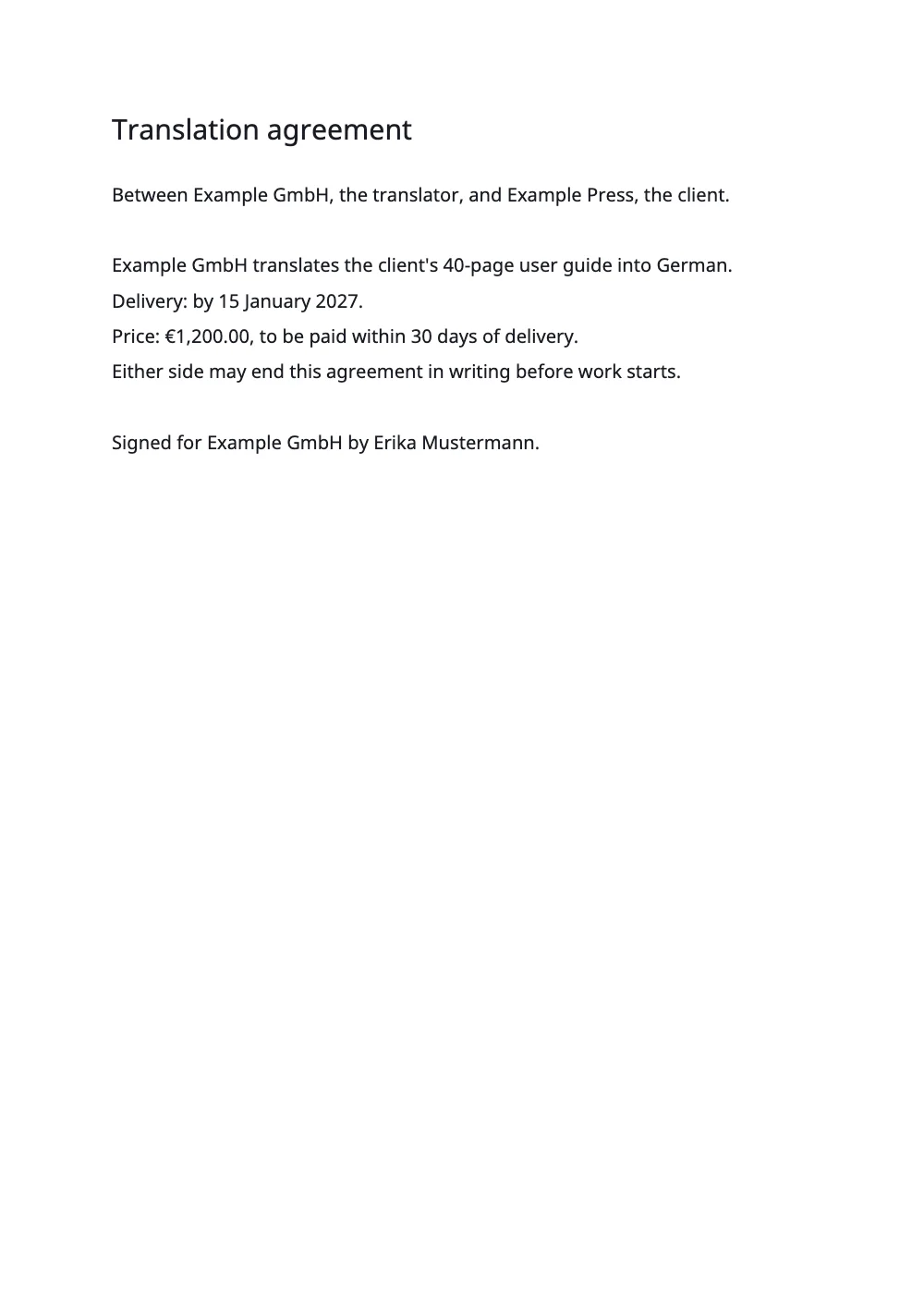
Try it: drag across the words on the page, or select all its text, then copy it. What you can copy is what the file holds.
The text in "Unsigned"
Translation agreement
Between Example GmbH, the translator, and Example Press, the client.
Example GmbH translates the client's 40-page user guide into German.
Delivery: by 15 January 2027.
Price: €1,200.00, to be paid within 30 days of delivery.
Either side may end this agreement in writing before work starts.
Signed for Example GmbH by Erika Mustermann.
Signed in PDF Stitch
The same agreement signed in PDF Stitch (Pro) with a test certificate in the name of Erika Mustermann, which no reader trusts by default. The words are the same; the box at the bottom right shows the signature.
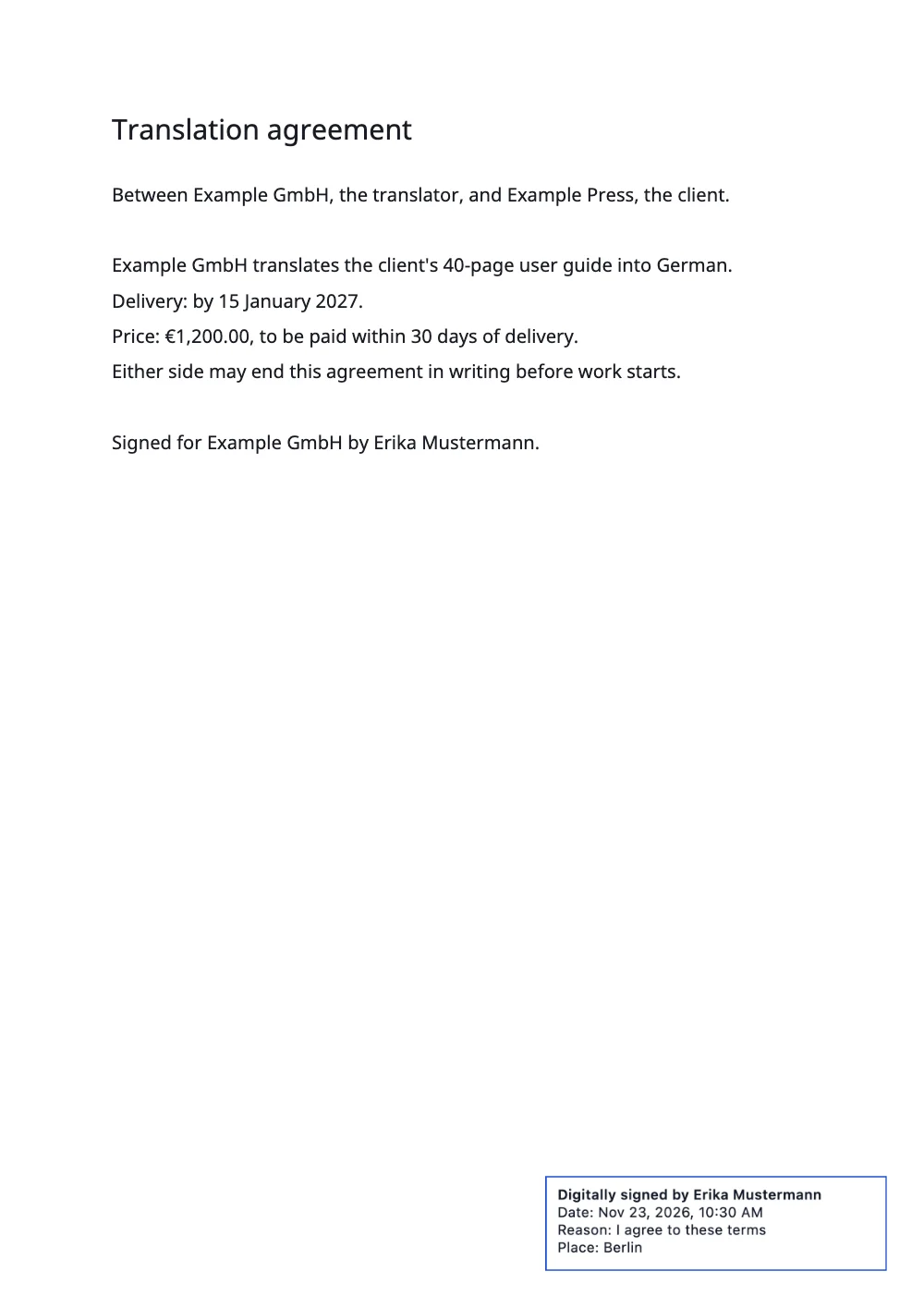
Try it: drag across the words on the page, or select all its text, then copy it. What you can copy is what the file holds.
The text in "Signed in PDF Stitch"
Translation agreement
Between Example GmbH, the translator, and Example Press, the client.
Example GmbH translates the client's 40-page user guide into German.
Delivery: by 15 January 2027.
Price: €1,200.00, to be paid within 30 days of delivery.
Either side may end this agreement in writing before work starts.
Signed for Example GmbH by Erika Mustermann.
Changed after signing
The signed copy with its price changed from €1,200.00 to €9,200.00 in the file itself, outside PDF Stitch, as someone altering it would. Nothing else was touched, and the page shows no sign of it.
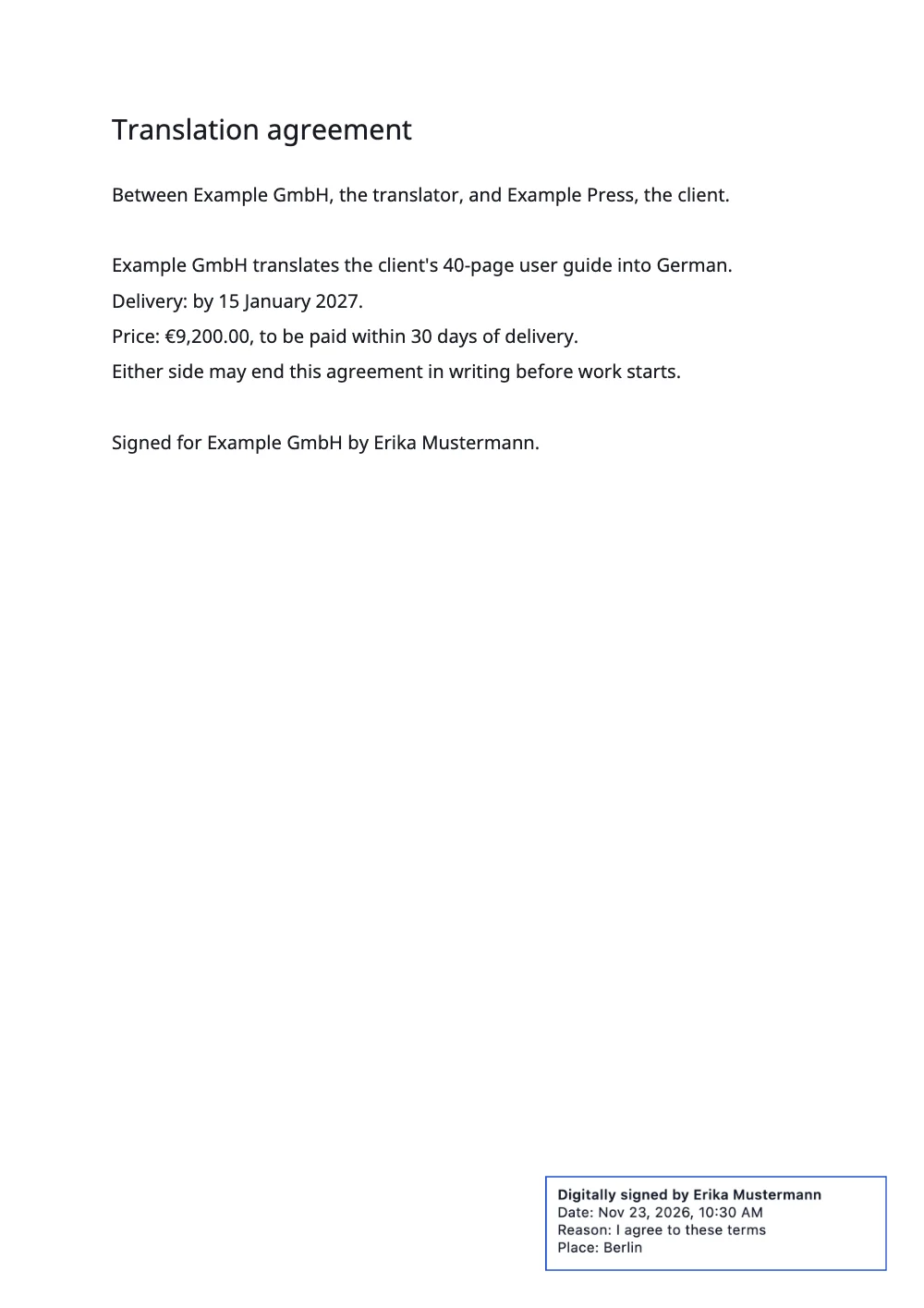
Try it: drag across the words on the page, or select all its text, then copy it. What you can copy is what the file holds.
The text in "Changed after signing"
Translation agreement
Between Example GmbH, the translator, and Example Press, the client.
Example GmbH translates the client's 40-page user guide into German.
Delivery: by 15 January 2027.
Price: €9,200.00, to be paid within 30 days of delivery.
Either side may end this agreement in writing before work starts.
Signed for Example GmbH by Erika Mustermann.
The signed copy holds the same words as the first: a signature adds nothing to the text. What it adds is the box at the bottom right of the page and, inside the file, the signature itself, which covers every byte of the file but its own.
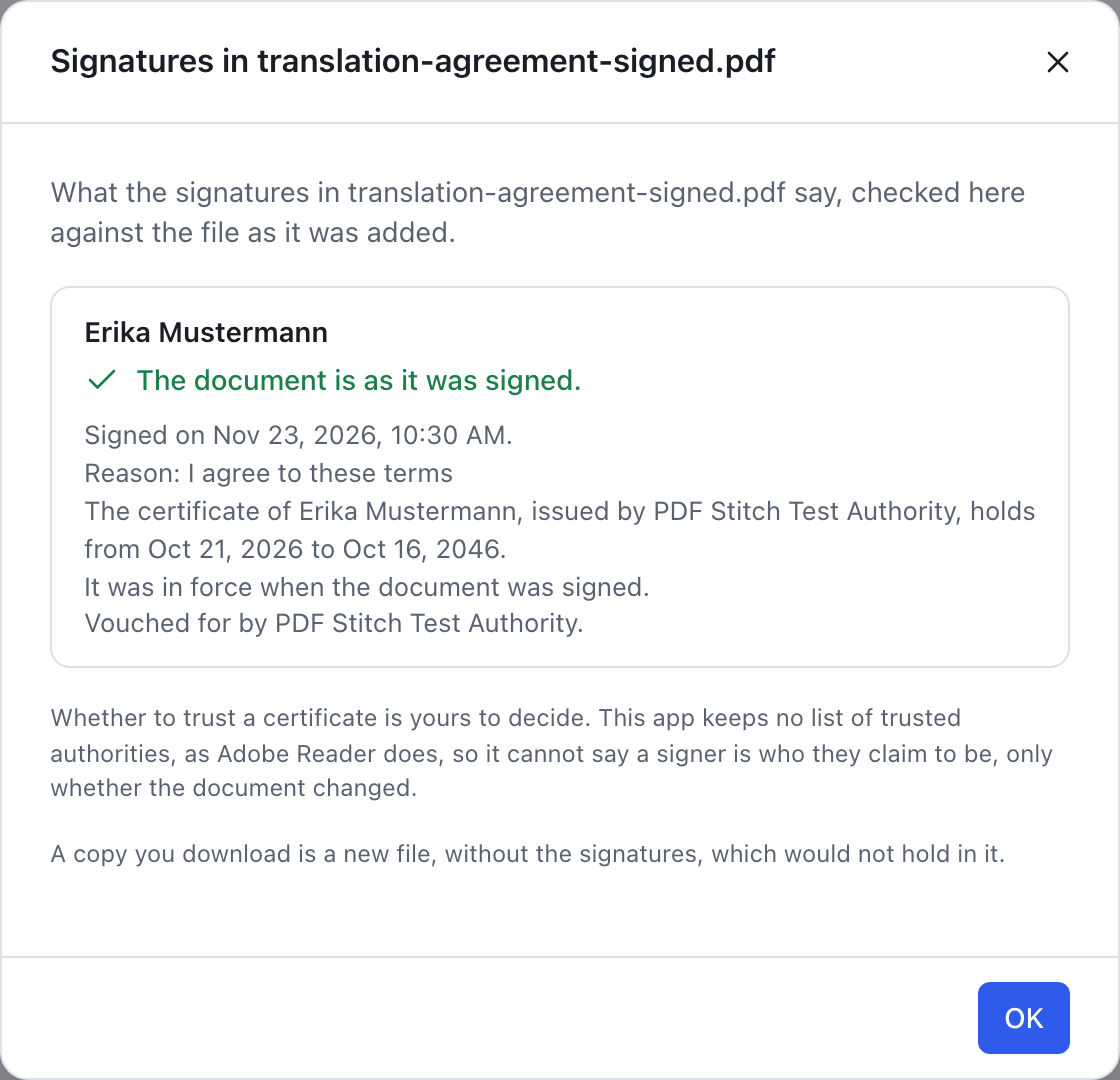
- Open the signed copy in PDF Stitch. A notice says it is signed by Erika Mustermann and is as they signed it. Press Details to see the signature.
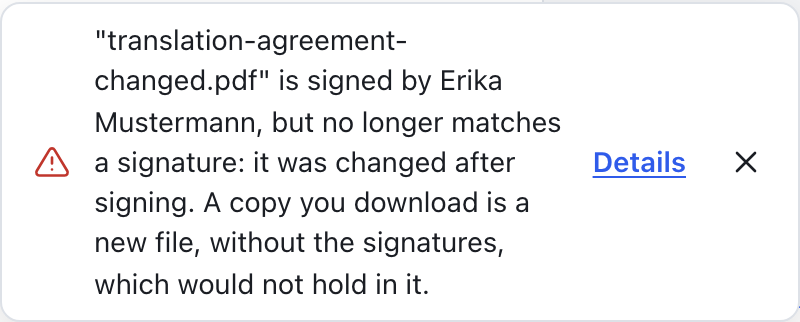
- Open the changed copy. The notice says it no longer matches its signature. Nothing on the page shows the change: only the check does.
- Poppler's pdfsig, another program that checks signatures, finds the signed copy's signature valid and its certificate's issuer not trusted, and the changed copy's digest no longer matching.
What you need to sign
A digital signature is made with a private key that only you hold, and a certificate, issued by a certificate authority, that says the key is yours. PDF Stitch signs with the two kept together in one file, a .p12 or .pfx file, opened with its password. You may already have one:
- A personal or staff certificate from a university, an employer or a certificate authority, as the authority gives it, or as Windows or the macOS Keychain exports it.
- A Spanish FNMT certificate: the FNMT's own instructions save a copy of it from Firefox as a .p12 file, protected by a password you choose.
- A Japanese commercial registration certificate (商業登記電子証明書) for a company's representative, which the registry offices under the Ministry of Justice issue as a file with the extension .p12.
- A Brazilian ICP-Brasil certificate kept as a file, such as an A1 e-CPF or e-CNPJ. ICP-Brasil ended the A1 type by Resolution 211 of 31 October 2024: its rules now list a person's signing certificates only as types A3 and A4, kept on cryptographic hardware such as a token or a smart card, which PDF Stitch cannot use. The same resolution lets certificates of the earlier types, A1 among them, be issued and used on the older certificate chain until 2 March 2029, and gives companies a seal certificate that may be kept in software. PDF Stitch does not follow ICP-Brasil's signature policies, and where Brazilian law asks for a qualified signature, a signature made here may not be accepted.
The file must hold the private key, not only the certificate: a .cer or .crt file has no key and cannot sign. The key may be RSA, or elliptic curve on the P-256, P-384 or P-521 curve, in the newer form of the file or the older one many files are still in. The certificate must be in force on the day you sign: PDF Stitch refuses one that has expired or has not started yet.
A certificate kept on a smart card, a USB token or an ID card, or held for you by a provider in the cloud, cannot be used. PDF Stitch signs only with a file you choose, and has no way to reach a key kept anywhere else.
No certificate at all? A picture of your handwritten signature on the page is a different thing: like a signed printout that was scanned, it shows your signature, but proves neither who placed it nor that nothing changed since.
How to sign a PDF with your certificate
Signing with a certificate is part of Pro.
- Open your PDF in PDF Stitch and put its pages together as they should be signed: the signature covers the file exactly as it is downloaded.
- Open More ways to export, the arrow next to Download, and choose Download signed with a certificate (Pro).
- Under Certificate file, choose your .p12 or .pfx file, and type its password under Its password.
- If you want, type a Reason and a Place. Show the signature on a page puts a box with your name, the date and these on the last page, at the bottom right; choose the first page or another place on it, or turn it off: the signature is in the file either way.
- Press Sign and download. The notice after downloading names whose certificate signed it.
Digital signature in PDF Stitch
If the password is wrong, PDF Stitch says so under it and lets you try again. Nothing is downloaded until the signature is made.
What the signature is. PDF Stitch makes a PAdES signature, the European standard for signed PDFs, at its baseline level: the kind named ETSI.CAdES.detached, over a SHA-256 digest of the whole file but the signature itself, with your certificate, and the others your file carries, inside it. It is made to be read by programs that check PAdES signatures, and our tests check with OpenSSL the signatures they make, and with Poppler's pdfsig the signed PDFs. It carries no time-stamp from a time-stamping authority, so the time it gives is your computer's clock, which is how Adobe's help describes the time of such a signature in Acrobat.
What stays in your browser. The certificate file and its password never leave your browser. The key is handed to the browser's own cryptography as one that cannot be read back out, and nothing of it is kept once the file is signed.
Sign last. A signature holds only while the file stays exactly as it was signed, so make every change first. If you change the document afterwards in PDF Stitch, the download is a new file: the signature is drawn on its page as it looked and is no longer a signature, and the notice after downloading says so. Sign the new file again. For the same reason, a PDF someone else signed does not keep their signature when you sign it in PDF Stitch: theirs is drawn on the page, and yours is the only signature in the file.
A PDF that limits printing, copying or changing it cannot keep those limits once signed. PDF Stitch asks before it signs one without them, which only someone with the right to remove them should do.
How to check whether a signed PDF was changed
Checking needs no certificate of your own.
- Open PDF Stitch, press Choose files and pick the signed PDF, or drop it on the page.
- A notice says who signed it and whether it is as they signed it. Press Details to see each signature: when it was signed, its reason, whose certificate it is and who issued it, the dates it holds, and whether it was in force that day.
- To see them again later, open the file's menu on the home screen and choose Signatures.
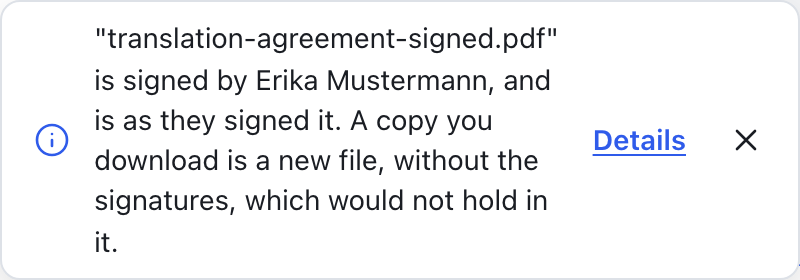
Check PDF signatures in PDF Stitch
What the check can say, in the app's own words:
- The document is as it was signed. Not one byte the signature covers has changed.
- The signed version is as it was signed, and the file was added to after that, for example by another signature or a filled-in form. Something was added at the end of the file, leaving the signed part as it was. The signature holds for what was signed, and does not cover what was added.
- The document does not match this signature: it was changed or damaged after it was signed. One changed digit is enough, as in the changed copy.
- This signature covers only part of the file, so what lies outside it may have been changed. A signature should cover the whole file but itself. One that leaves part out says nothing of that part, so the notice on opening warns of it.
- This signature cannot be read. Its data is damaged, or is not a signature at all.
- This signature is made in a way this app cannot check. Another program may be able to check it.
What the check cannot tell you. It shows whether the document changed, and whose name the certificate gives. It cannot tell you whether to trust that certificate: PDF Stitch keeps no list of trusted authorities, as its details say. It does not ask the authority whether the certificate was withdrawn (revoked), as it fetches nothing. And unless a time-stamping authority confirms the time, which the details say when one does, the time of signing is what the signer's computer said.
Will others trust your signature?
A reader checks two things: that the file is as it was signed, and that it trusts the certificate. The first rests on the file's own bytes alone. The second depends on the reader's own list of trusted certificates.
Adobe's guide for Acrobat says a signature validates only when the signer's certificate, or a certificate it chains up to, is trusted. Acrobat and Reader download a list of trusted authorities, the Adobe Approved Trust List, and use the EU's trust list the same way. A signature from a certificate those lists lead to can validate with nothing set up by hand. For any other certificate, such as one from your university or employer, someone has to choose to trust it, or its authority, in Acrobat's settings, or an administrator sets that up for everyone.
The sample's test certificate is on no such list, so a reader finds its signature intact but does not trust its signer. Poppler's pdfsig says exactly that of the signed copy.
What the law says
In the EU, the eIDAS Regulation (EU) No 910/2014 sets the rules. An electronic signature cannot be denied legal effect, or refused as evidence in court, only because it is electronic or because it is not qualified (Article 25(1)). A qualified electronic signature has the same legal effect as a handwritten one (Article 25(2)); the Regulation gives that effect to no other kind. A qualified signature is made with a qualified signature creation device and rests on a qualified certificate (Article 3(12)).
A signature made in PDF Stitch is not a qualified one: its key comes from a file, used by your browser, which is not a qualified signature creation device. It can be an advanced electronic signature, which Article 26 defines by four requirements: it is uniquely linked to the signer, it can identify them, it is made with signing data they can use under their sole control with a high level of confidence, and any later change to the signed data can be detected. The last is what the check shows; the others depend on your certificate and on how you keep its file.
Whether a document needs a qualified signature, or ink on paper, is set by the law for that document, not by the program you sign with. In Japan, the Ministry of Justice notes that some procedures accept only certificates on an IC card, and suggests checking which kind the office you send to accepts. When you are unsure, ask them, or a lawyer.
You do not have to take our word for it
-
Watch the network
The "Nothing is uploaded" button in the app opens a list of every other site the page has contacted since you opened it, and how often, taken from the browser's own record. Your browser's developer tools show every request, this site's own included.
-
Pull the plug
Once the app has loaded, turn off your network and keep working. Text recognition, the document converter and the handwriting fonts work offline too after their first use.
-
Redaction that removes
A page with something blacked out is saved as a picture of itself, so the text under the box is gone, and every redacted page is checked before the file is saved.
Questions
- Is signing with a certificate free?
- Checking the signatures in a PDF is free. Signing with your own certificate is Pro.
- Is my certificate file or its password sent anywhere?
- No. PDF Stitch runs in your browser. The certificate file and its password stay there, the key is handed to the browser as one that cannot be read back out, and the PDF is not uploaded either.
- Can I sign with a smart card, a USB token or my ID card?
- No. PDF Stitch signs only with a .p12 or .pfx file, and cannot reach a key kept on a card, a token or with a provider in the cloud.
- Why does another reader not trust my signature?
- Most often because the reader does not trust your certificate's authority. Acrobat trusts authorities on Adobe's own list and the EU's; others must be trusted by hand, in its settings. The signature itself is unchanged, and the reader still says whether the document changed.
- Is it a qualified electronic signature?
- No. Under the EU's eIDAS rules a qualified signature needs a qualified signature creation device, and a key used from a file in your browser is not one. It can be an advanced electronic signature.
- Can I add my signature to a PDF that someone already signed?
- Not keeping theirs. The signed download is a new file, so their signature is drawn on the page as it looked and is no longer a signature, and yours is the only one in it.
- Does the signature carry a trusted time?
- No. It carries no time-stamp from a time-stamping authority, so its time is your computer's clock. When PDF Stitch checks a signature that has one, its details say what time the authority confirms.
Sources
- Regulation (EU) No 910/2014 (eIDAS), consolidated text of 18 October 2024: Articles 3, 25 and 26
- Ministry of Justice of Japan: frequently asked questions on commercial registration certificates (Q4, a .p12 file)
- Ministry of Justice of Japan: getting a commercial registration certificate as a file (some procedures accept only IC cards)
- FNMT: how to export your certificate with Mozilla Firefox (a .p12 file)
- ICP-Brasil: DOC-ICP-04, minimum requirements for certificate policies, version 8.3 (certificate types and where their keys are kept)
- ITI: resolutions of the ICP-Brasil Management Committee, among them Resolution 211 of 31 October 2024 (in Portuguese)
- Adobe: Acrobat Desktop Digital Signature Guide, pre-deployment configuration (trust anchors, the Adobe Approved Trust List and the EU Trust List)
- Adobe: Set certificate trust level in Acrobat
- Adobe: Validate digital signatures in Acrobat (the time of a signature with no time-stamp)