Before you send a copy of your ID: watermark it and black out what is not needed
Send a copy only when you must. Then black out the details the recipient does not need, such as the card's number and your signature, and write across the copy that it is a copy, what it is for, who it is for and the date. PDF Stitch does both to a photo of your card in your browser, without uploading it.
See it for yourself: a photo of a card, and the copy to send
Both files start from the same photo of a made-up identity card, marked SPECIMEN. The first is the photo as many people send it. The second is the copy made from it in PDF Stitch, following the steps on this page.
The photo of the card
A phone photo of a made-up card on a table, put in a PDF as it is: every detail on it can be read and used again.
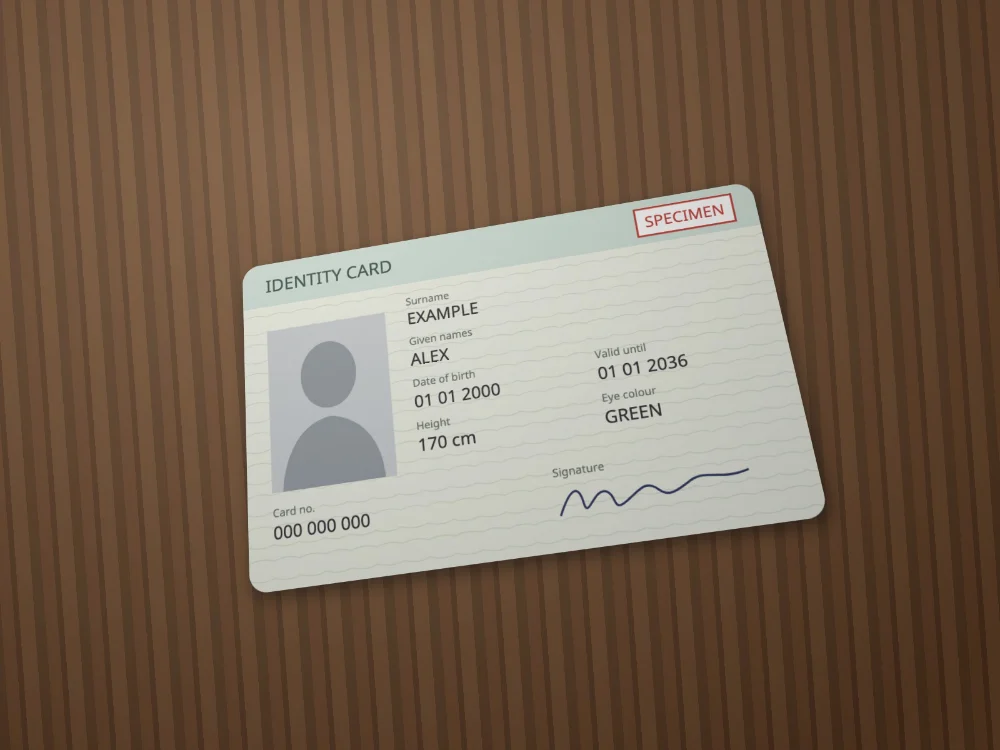
Try it: drag across the words on the page, or select all its text, then copy it. What you can copy is what the file holds.
The text in "The photo of the card"
This file holds no text at all.
The copy to send
The same photo after Scan pages, Redact and Watermark in PDF Stitch: the card on a page close to its own shape, the details not needed blacked out, and what the copy is for written across it.
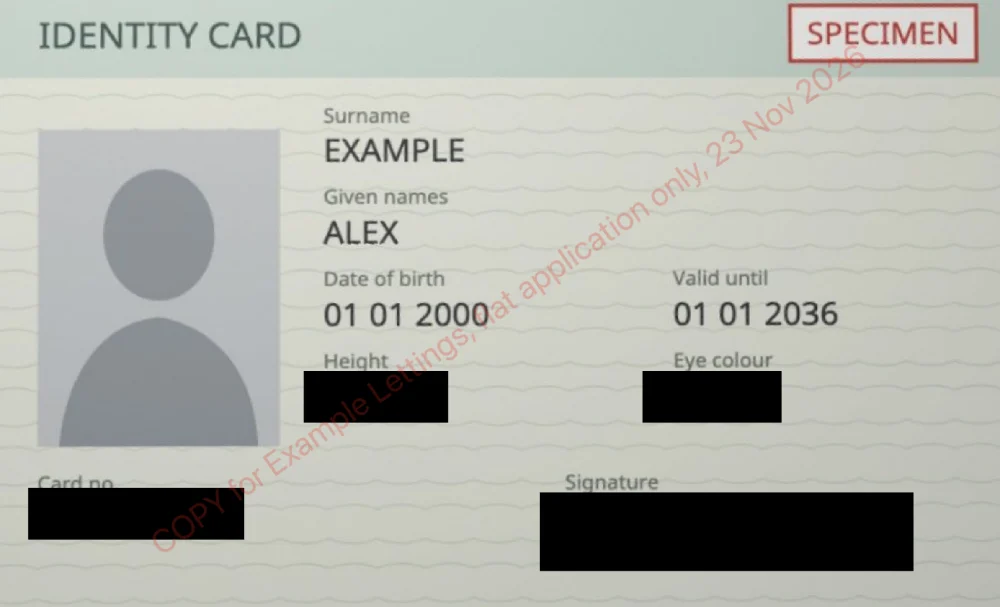
Try it: drag across the words on the page, or select all its text, then copy it. What you can copy is what the file holds.
The text in "The copy to send"
This file holds no text at all.
- In the first file, the card number, the height, the eye colour and the signature can all be read, and nothing on it says who it was sent to. A copy like it can be sent on to anyone, for anything.
- In the second, those details are black, and the watermark across the card says it is a copy, for one letting agent, for a flat application only, on one date. Used anywhere else, it gives itself away.
- Neither file holds text you can copy out: both are pictures. In the second, there is nothing under the black boxes either. A page with a redaction is saved as a picture of itself, with the boxes in it.
How to make a safe copy of your ID
Lay the card on a dark, plain surface, in good light. For a passport, use the page with your photo on it. Then:
1. Make the card a page of its own.
- Open PDF Stitch and press Scan pages. On a phone, photograph the card from above so it fills most of the photo; on a computer, choose a photo taken that way.
- Check that a dot sits on each corner of the card, drag any that does not, and press Straighten the page. For the back of the card, press Add another page and do the same.
- Press Open as a new stitch.
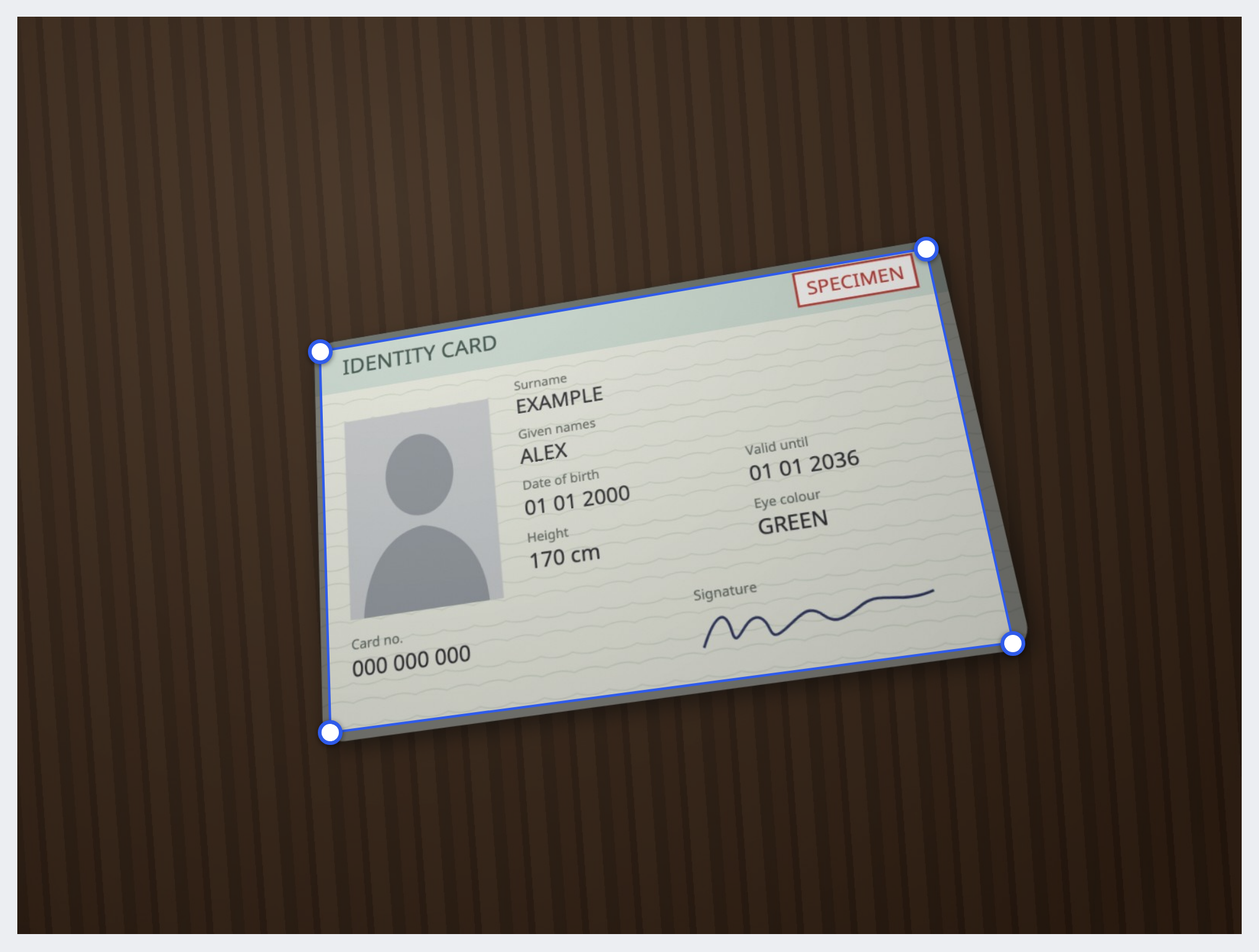
The card comes out flat and straight, on a page close to the card's own shape, so the watermark is written across the card itself and not across a sheet of paper around it.
2. Black out what the recipient does not need.
- Double-click the page, or press the pencil button on its corner, to open it large.
- Choose the Redact tool (X) and draw a box over each detail to remove, such as the card's own number and your signature.
- Press Back to all pages.
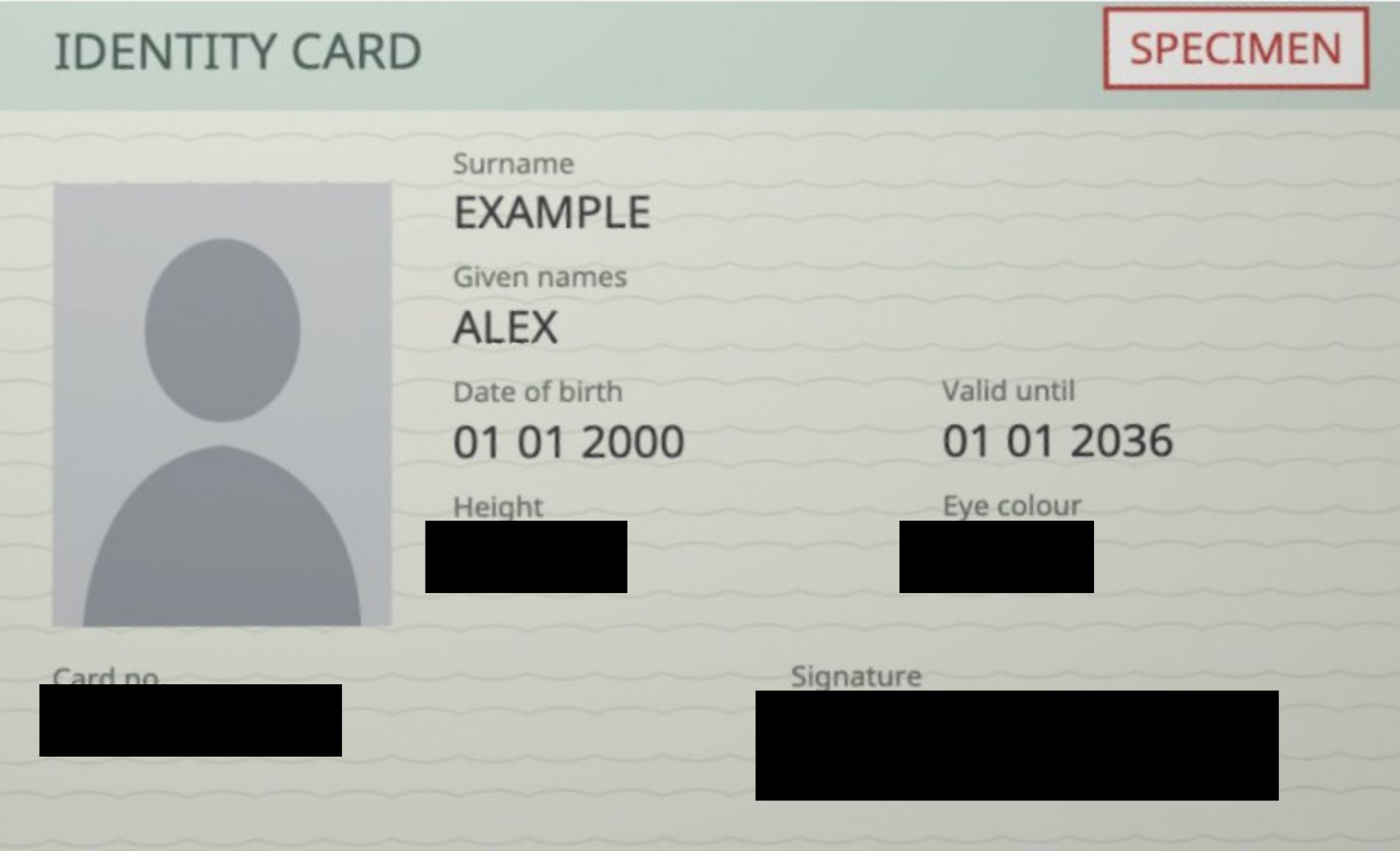
3. Write what the copy is for across it, and download it.
- Open Tools and choose Watermark.
- Under Text, write that it is a copy, what it is for, who it is for and the date, such as "COPY for Example Lettings, flat application only, 23 Nov 2026".
- Keep Diagonal, so the words run slanted across the middle of the card and its details, and press Add watermark.
- Look at the copy before you download it. If the words are hard to read over the card, open Watermark again, type the words again and choose another Strength, such as Strong, or another colour: the new watermark takes the old one's place.
- Press Download, and send the file it saves.
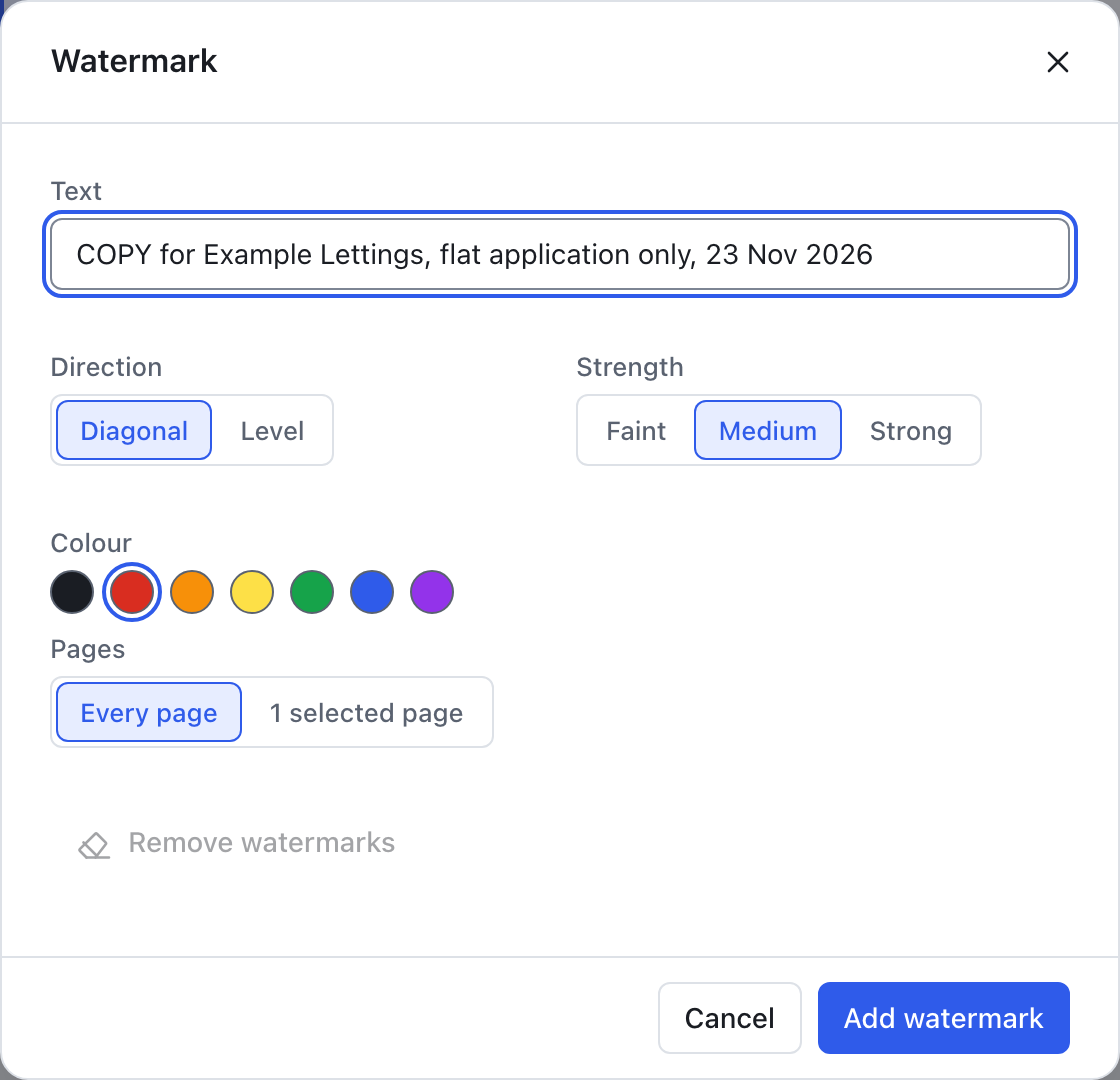
A watermark is one line, sized to fit across the page, so the more words, the smaller they are: say what is needed and no more.
What to write in the watermark
The point of a watermark is that a copy cannot quietly be used for something else. German consumer advice lists four things to write in it, and the French government's advice the last three of them:
- That it is a copy. "COPY" is enough.
- What it is for: the flat, the account, the booking.
- Who it is for: the company or person you are sending it to.
- The date you send it.
The Verbraucherzentrale Niedersachsen, a German consumer advice centre, gives the example "Ausweiskopie für Registrierung bei der Bank XY am 12.12.2026" (a copy of my ID, for registering with bank XY, on 12 December 2026). The French state's FiligraneFacile service suggests "Document exclusivement destiné à la location immobilière" (a document for renting a home only).
In PDF Stitch the words run across the middle of the card, over the details there, so they cannot be cut away without cutting away the card. France Num, the French government's advice for businesses, describes a watermark as visible enough to be seen, but not enough to get in the way of reading the page: a copy nobody can read may be refused.
Make a new copy, with a new watermark, for each time you send it. A copy watermarked for a landlord is the wrong copy for a bank.
What to black out
Black out what the recipient does not need to know who you are. What that is depends on the card and on why they ask, so ask them. The details most often listed are these:
- The card's own number, and any other numbers on it, such as an access or serial number.
- Your signature. Checking who you are does not need it.
- Details about your body, such as height and eye colour, where the card has them.
Send the back of the card only if it is asked for.
The Verbraucherzentrale Niedersachsen lists the card's number, its access and serial numbers, height, eye colour and the signature as details a recipient does not need.
Black it out with Redact, not by cropping the page or drawing a shape over it. A cropped edge and a shape both stay in the file, under what you see; a redacted page is saved as a picture of itself, with the black boxes in it, so what was under them is gone.
Some recipients must keep a complete copy by law, and a blacked-out one may be refused. A landlord in England who checks a tenant's right to rent from the original documents, for one, must do so with the tenant there and keep copies: of a passport, every page with the expiry date or the holder's details, and of any other document, a complete copy. If you are told a copy must be whole, ask why, and whether a watermark is accepted.
Whose rules these are
Each country has its own rules on copies of ID documents. These are a few, each for its own country only:
- Germany. The law on identity cards (§ 20 (2) PAuswG) says the card may be copied only by its holder, or by someone else with the holder's consent, and only so that the copy can be clearly and lastingly recognised as a copy. Anyone but the holder may not pass the copy on. The Verbraucherzentrale Niedersachsen says a copy is not allowed where you could show the card instead, may be used only for what it was made for, and should be destroyed once you have been identified: the card may not be scanned and stored.
- France. The state runs FiligraneFacile, a website that writes a watermark across a document and gives it back as a PDF. Its files go to its servers: it says the originals are deleted once the copy is made, and the copy after its first download, or after a day. The government's France Num advice adds that French public bodies are in theory meant to accept a watermarked document, as long as the watermark leaves it, and its security features such as a QR code, readable.
- Spain. The data protection authority, the AEPD, said in June 2025 that hotels and other places to stay may not ask for a copy of an identity card or passport. It notes that a DNI carries more than they need, such as the photo, the card's expiry date and its CAN number, which adds to the risk of someone posing as you, and that a copy sent in does not prove who sent it.
- Japan. Akita City, for one, says that the front of a My Number card may be copied with its holder's consent, for example to register as a member of a shop, but that the back, which shows the My Number, may not be copied except for procedures set by law or by local rules.
- England. A landlord must check that each adult tenant has the right to rent: from the original documents with the tenant there, through a registered Digital Verification Service for British and Irish citizens, or online with a share code, and keep copies of the documents (of a passport, the pages with the expiry date or the holder's details; of other documents, the whole), or a record of the online check, for the tenancy and a year after.
Wherever you are, ask why a copy is needed and what is done with it. Where you can show the card in person instead, or prove who you are another way, the safest copy is none.
What a watermark cannot do
A watermark makes misuse harder and easier to notice. It does not make a copy safe. France Num, the French government's advice for businesses, says plainly that watermarks are not foolproof: they can be taken off with picture editing software or with artificial intelligence. It compares one to a bicycle lock, which can be cut and is still worth having.
- A watermark does not stop a copy being read. Everything not blacked out can still be read and written down.
- It protects the copies you send from now on, not those you have already sent.
- Some recipients, such as banks and public bodies, may need a copy without one: FiligraneFacile itself says so. Ask before you send it, rather than being turned down after.
- Send a copy only to someone you know is who they say they are. A message asking for a copy of your ID can be a fraud in itself.
In the file PDF Stitch saves, the watermark is drawn into the page, not added as a comment any PDF reader can hide. But it is a picture of its own over the page, so a PDF editor can still lift it off.
You do not have to take our word for it
-
Watch the network
The "Nothing is uploaded" button in the app opens a list of every other site the page has contacted since you opened it, and how often, taken from the browser's own record. Your browser's developer tools show every request, this site's own included.
-
Pull the plug
Once the app has loaded, turn off your network and keep working. Text recognition, the document converter and the handwriting fonts work offline too after their first use.
-
Redaction that removes
A page with something blacked out is saved as a picture of itself, so the text under the box is gone, and every redacted page is checked before the file is saved.
Questions
- Is this free in PDF Stitch?
- Yes. Scan pages in colour, the Redact tool drawn by hand, and Watermark are free. The Greyscale and Black and white looks of Scan pages are Pro.
- Is the photo of my ID uploaded?
- No. PDF Stitch runs in your browser: the card is found and straightened on your device, and blacked out and watermarked there, with nothing sent anywhere.
- Can a watermark be removed?
- It can be made harder to misuse, not impossible to remove. In the file PDF Stitch saves, the watermark is drawn into the page rather than added as a comment, but it is a picture of its own that a PDF editor can lift off, and picture editing software or artificial intelligence can paint it out, as the French government's advice warns. That is why the details not needed should be blacked out too: a black box takes them out of the file.
- Can someone refuse a watermarked copy?
- Yes. Some organisations, such as banks and public bodies, may ask for a document without a watermark, and some must keep a complete copy by law. Ask what they need before you send it, and whether you can show the card in person instead.
- My card is on a scanned A4 page. Can I use that?
- The watermark is written across the middle of the whole page, sized for it, so on an A4 page it may miss a small card. Crop does not help: it hides the edges of a page without making the page smaller for the watermark, and what it hides stays in the file. Photograph the card on its own and use Scan pages, which gives a page close to the card's own shape.
- What about the back of the card?
- Send it only if it is asked for. In Scan pages, press Add another page to add it as a second page. Watermark writes across both pages. The Redact tool works on each page you open.
- Should I black out my photo?
- Only if the recipient does not need it. The photo is what lets someone match the card to you, and the German consumer advice leaves it off its list of details to black out. But the AEPD counts the photo among what a hotel in Spain has no need of. Where it stays, the watermark may pass beside it: PDF Stitch writes it across the middle of the page.
Sources
- Germany: § 20 Personalausweisgesetz (PAuswG), on the use of the identity card and copies of it
- Verbraucherzentrale Niedersachsen: Ausweiskopien mit Wasserzeichen (15 October 2026, in German)
- FiligraneFacile, the French state's watermarking service (in French)
- France Num, the French government's advice for businesses: FiligraneFacile (updated 23 November 2026, in French)
- AEPD: no está permitido solicitar una copia del DNI o pasaporte en los hospedajes (17 June 2025, in Spanish)
- Akita City: マイナンバーカードの裏面のコピーに注意 (the back of the My Number card, in Japanese)
- GOV.UK: Check your tenant's right to rent