Make a certificate for every name on a list
Write the certificate once in Word, with a field such as {{name}} where each name goes, and keep the names in a spreadsheet whose first row names the columns. Save the list as CSV and fill the template from it in PDF Stitch (Pro): you get one PDF with a page for each person, which you can split into a file each.
See it for yourself: a template and what it makes
The first file is a certificate as a Word document, with a field wherever a value from the list goes. The second is what PDF Stitch made from it and a list of four made-up people: a page for each, every field filled in. Under each page is the text the file holds, read out of it.
The template
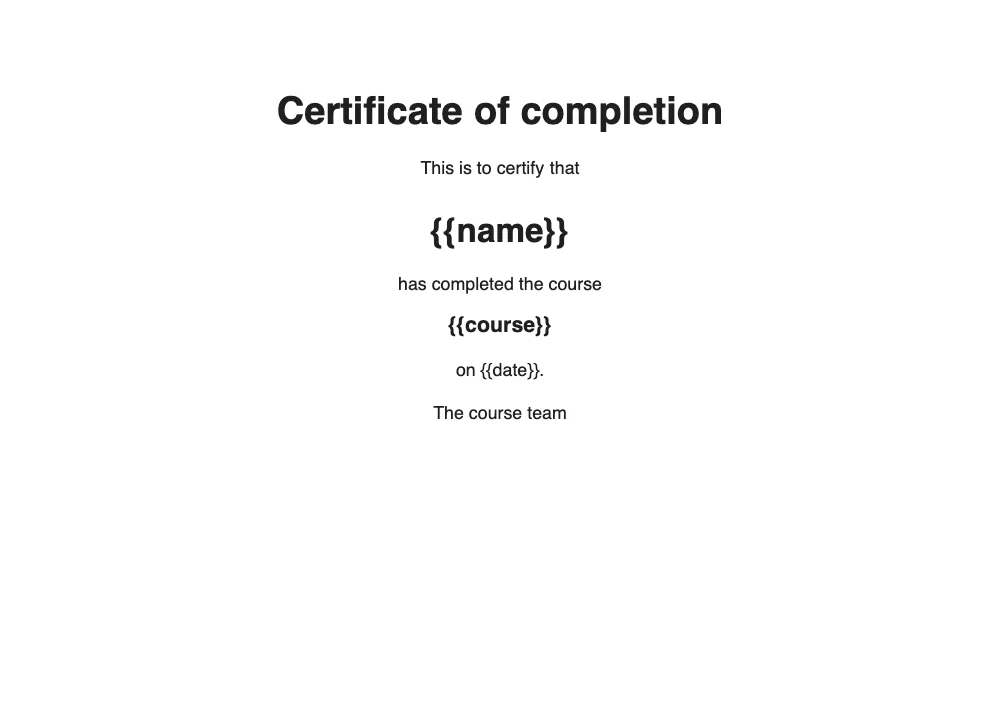
A certificate as a Word document (.docx), with a field for each value from the list: {{name}}, {{course}} and {{date}}. Opened in PDF Stitch, which turns a Word document into a PDF.
Try it: drag across the words on the page, or select all its text, then copy it. What you can copy is what the file holds.
The text in "The template"
Certificate of completion
This is to certify that
{{name}}
has completed the course
{{course}}
on {{date}}.
The course teamThe certificates
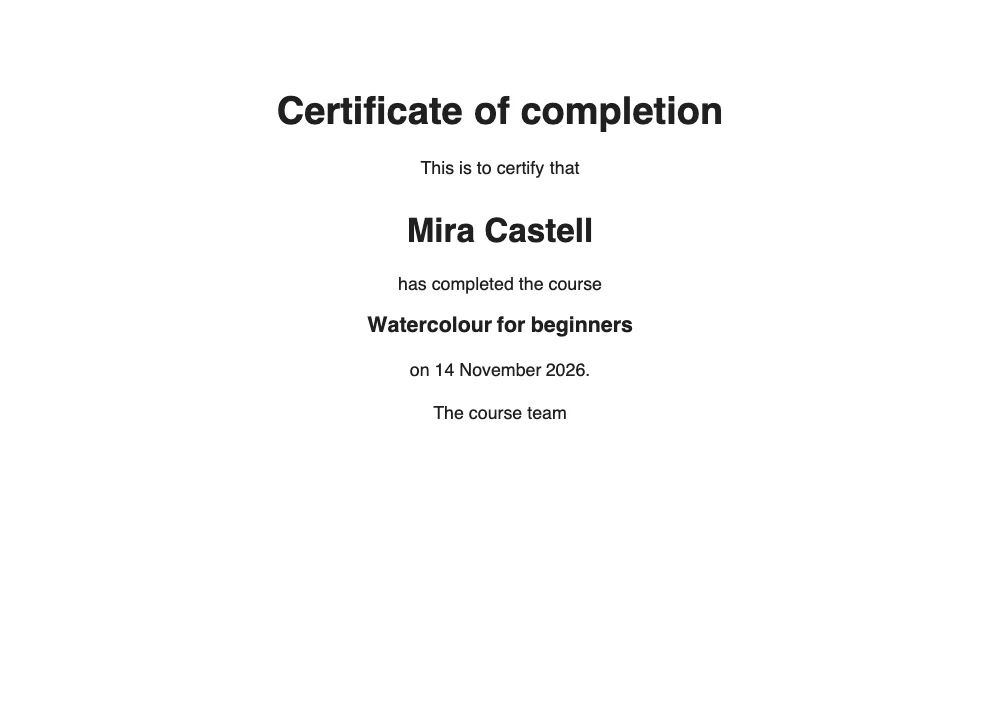
The same template filled in PDF Stitch (Pro) from a list of four people: a page for each, in the list's order, each field filled from that person's row.
Try it: drag across the words on the page, or select all its text, then copy it. What you can copy is what the file holds.
The text in "The certificates"
Page 1
Certificate of completion
This is to certify that
Mira Castell
has completed the course
Watercolour for beginners
on 14 November 2026.
The course team
Page 2
Certificate of completion
This is to certify that
Tomas Wren
has completed the course
Watercolour for beginners
on 14 November 2026.
The course team
Page 3
Certificate of completion
This is to certify that
Priya Okafor
has completed the course
Bread baking at home
on 21 November 2026.
The course team
Page 4
Certificate of completion
This is to certify that
Jonah Pell
has completed the course
Bread baking at home
on 21 November 2026.
The course team
The files the samples were made from, to try it yourself: certificate.docx certificate-list.csv
name,course,date
Mira Castell,Watercolour for beginners,14 November 2026
Tomas Wren,Watercolour for beginners,14 November 2026
Priya Okafor,Bread baking at home,21 November 2026
Jonah Pell,Bread baking at home,21 November 2026- On the second file, select a name and copy it: it is ordinary text, so the certificates can be searched.
- Look at the first file: each field is a column's name between two braces on each side, and the list's first row names those columns, name, course and date.
How to make the certificates
1. Write the certificate in Word. Lay it out once, as it should look on paper, and type a field wherever a value from the list goes: the column's name between two braces on each side, such as {{name}}. Save it as a .docx file (or .docm, .dotx or .dotm), or from LibreOffice as .odt or .ott.
- A field's name is letters, digits, _, - and . with no spaces: write
{{first_name}}, and head the column first_name, rather than "first name". With a space it is not read as a field, and PDF Stitch says so before it makes anything. - Word's own merge fields, the ones it shows as «name», are not read here. Type
{{name}}in their place. - Lay the page out with plain paragraphs, centred if you like, on a page turned to landscape if you like, rather than text boxes and floating pictures. PDF Stitch lays the document out again itself, in its own fonts, so a design built from text boxes can move. You see every page before you download.
- A page border set in Word is not drawn here: the certificates come out without it.
- Fields are filled in the text, in tables, and in headers, footers and footnotes.
2. Make the list. In Excel or any spreadsheet, put the column names in the first row, each written exactly as its field is in the template, capitals included, and a row for each person under it. Columns the template does not use are left alone, and a cell left empty comes out empty.
3. Save it as CSV. In Excel, choose File, then Save As or Save a Copy, and pick CSV UTF-8 (Comma delimited) or CSV (Comma delimited) as the type. Only the sheet you are on is saved. In Excel for the web, choose File, then Export, then Download this sheet as CSV (.csv); Microsoft's note on this feature, last updated in January 2025, says it saves in ASCII only, which has no letters such as é or ü, so for names like those, save from the desktop app. PDF Stitch reads a CSV saved either way, separated by commas, semicolons or tabs.
No CSV at hand? Choose your template first, then choose Type it in: the table starts with a column for each field of your template. Copy the cells in your spreadsheet, header row included, click the first column's name and paste: the rows spread across the table, as they would in a spreadsheet.
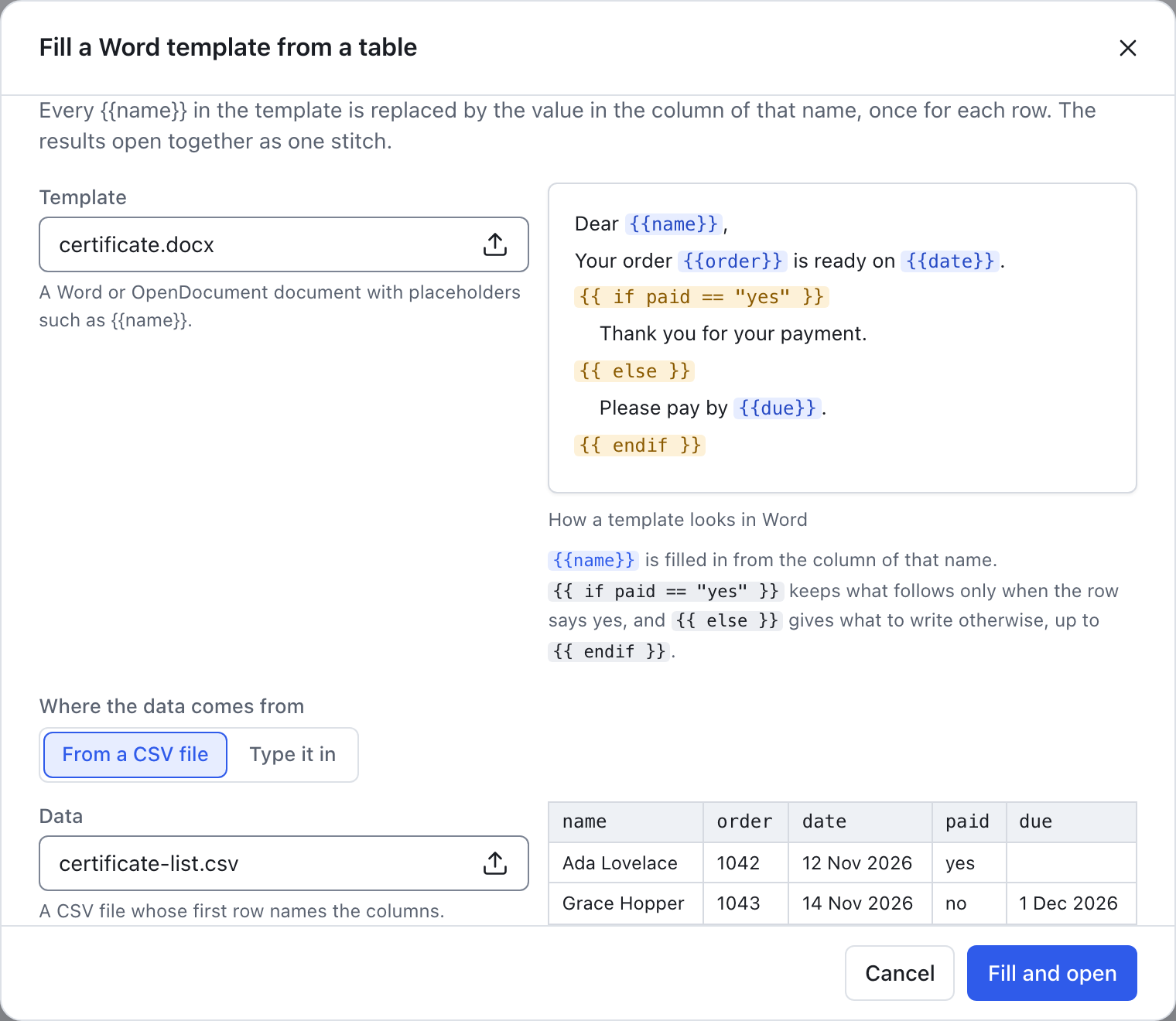
4. Fill the template in PDF Stitch:
- On the first screen, press Fill a Word template (Pro). With a file already open, open Tools and choose Fill a Word template from a table.
- Under Template, choose your Word file. Under Data, keep From a CSV file and choose the CSV file.
- Press Fill and open. The list is checked against the template first; then every certificate opens, together, as one stitch.
- Look through the pages, then press Download for one PDF with every certificate in it.
Fill a Word template from a table in PDF Stitch
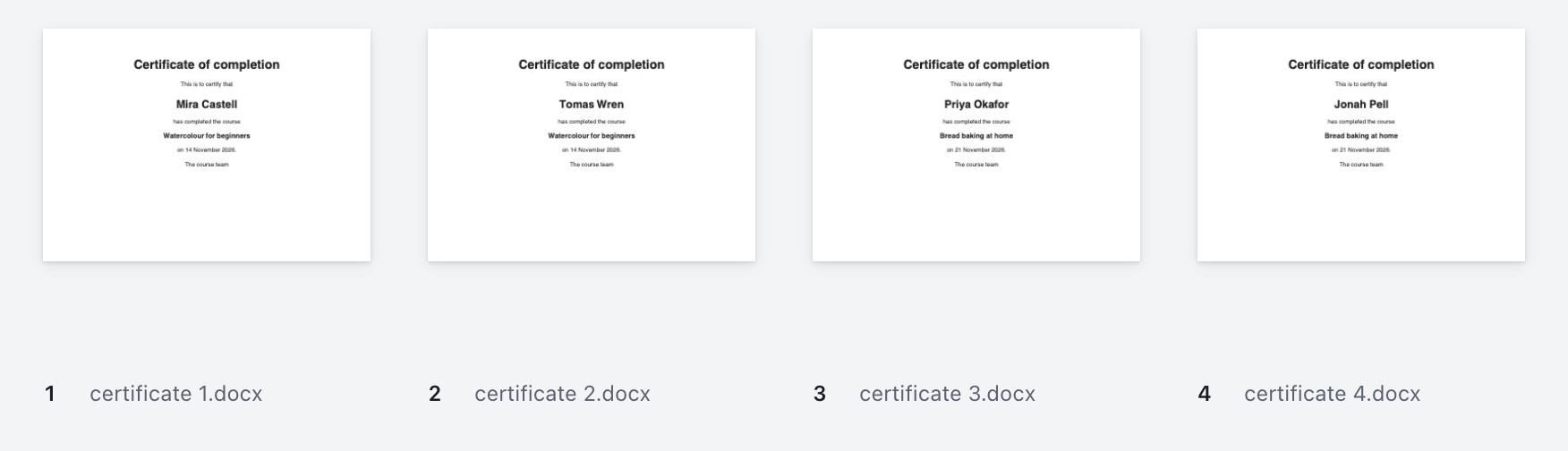
5. A file for each person, if you need one:
- With the certificates open, open More ways to export (the arrow next to Download) and choose Split into parts.
- Under Start a new part, choose Where the pages change from one file to another.
- Press Download as a zip.
Each person's certificate was made as a file of its own, so it becomes a PDF of its own, however many pages it has. The files are named after the template and numbered in the list's order: certificate 1.pdf is the first person on the list, and certificate 4.pdf the last.
What the check catches
Before it makes anything, PDF Stitch reads the template and checks the list against it. Each of these is named in the dialog, with the field or the rows it is about, and nothing is made until it is put right:
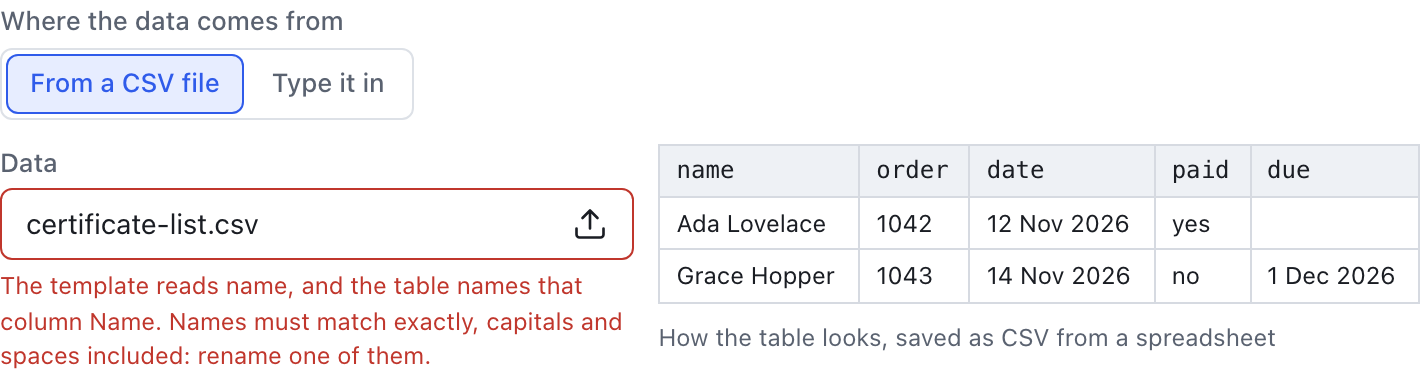
- A column named a little differently.
{{name}}in the template and Name in the list are not the same name: rename one of them. - A column missing. A field with no column of its name in the list. Add the column; its cells may be left empty.
- Text that looks like a field but is not one, where it names a column of the list: a name with a space, one brace where two belong, or braces typed full-width, as a Japanese keyboard types them. It would be printed as it stands.
- Word's own merge fields, where one names a column of the list, or the template has no other fields.
- Two columns with the same name, or a list with nothing under its first row.
What no check can see is a value that is wrong in the list itself, such as a name misspelt. Each cell is printed as the CSV file holds it, without any spaces around it, so look through the pages before you download.
Why not do it all in Word?
Word has a mail merge of its own. What it does not do by itself is save a separate file for each person:
- Merging to a new document puts every copy into one file, "with a page break between each copy of the document", as Microsoft's help says.
- Microsoft's programming reference for Word lists four places a merge's results can go: a new document, a printer, email and fax. A file for each person is not one of them.
- So people who need a PDF for each person turn to macros or add-ins. On Microsoft's own question and answer site, a Microsoft MVP answers someone asking for this with his Merge Tools add-in.
In PDF Stitch, every certificate is its own file from the start, so one more step gives a PDF each. And nothing needs installing: it runs in your browser, and the template and the list are not uploaded.
You do not have to take our word for it
-
Watch the network
The "Nothing is uploaded" button in the app opens a list of every other site the page has contacted since you opened it, and how often, taken from the browser's own record. Your browser's developer tools show every request, this site's own included.
-
Pull the plug
Once the app has loaded, turn off your network and keep working. Text recognition, the document converter and the handwriting fonts work offline too after their first use.
-
Redaction that removes
A page with something blacked out is saved as a picture of itself, so the text under the box is gone, and every redacted page is checked before the file is saved.
Questions
- Is it free?
- Filling a template from a list is Pro. Opening a Word document as a PDF is free, and so is splitting a PDF into parts; splitting at bookmarks is Pro.
- Can each file be named after the person?
- No. Each file is named after the template, with its row's number: certificate 1.pdf is the first person on the list. Put the list in the order you want the files in.
- Can I choose an Excel file instead of a CSV?
- No: save the sheet as CSV first, or choose Type it in and paste the cells into the dialog.
- Can the column names be in another script, such as Japanese?
- Yes. A field's name can be letters of any script, so a column headed 氏名 fills {{氏名}}. It cannot hold a space. Save the list as CSV UTF-8, which keeps every script.
- What if the certificate runs over one page?
- Each person's pages stay together, in the list's order, and splitting where one file ends gives each person all of their own pages.
- Is the list uploaded anywhere?
- No. PDF Stitch runs in your browser, and the template, the list and the certificates stay on your device. What it needs to read Word documents is fetched from this site the first time you use it.
Sources
- Microsoft Support: Field codes: MergeField field
- Microsoft 365 Insider blog: Export to CSV in Excel for the web (March 2024, updated January 2025)
- Microsoft Support: Merge to new document
- Microsoft Learn: WdMailMergeDestination enumeration (Word)
- Microsoft Q&A: Saving letters individually on mail merge (2020)
- Microsoft Support: Insert mail merge fields
- Microsoft Support: Mail merge using an Excel spreadsheet
- Microsoft Support: Save a worksheet as a CSV file (desktop Excel)
- Microsoft Support: Import or export text (.txt or .csv) files