Sign a PDF with a photo of your own signature
Sign a sheet of white paper and photograph it in good light. Open the PDF in PDF Stitch, choose the Signature tool, click the signature line, choose From a picture and your photo: Take out the paper leaves only the ink. Drag it onto the line, add the date and download: the page shows your signature as a picture, not a certificate signature.
See it for yourself: one form, before and after
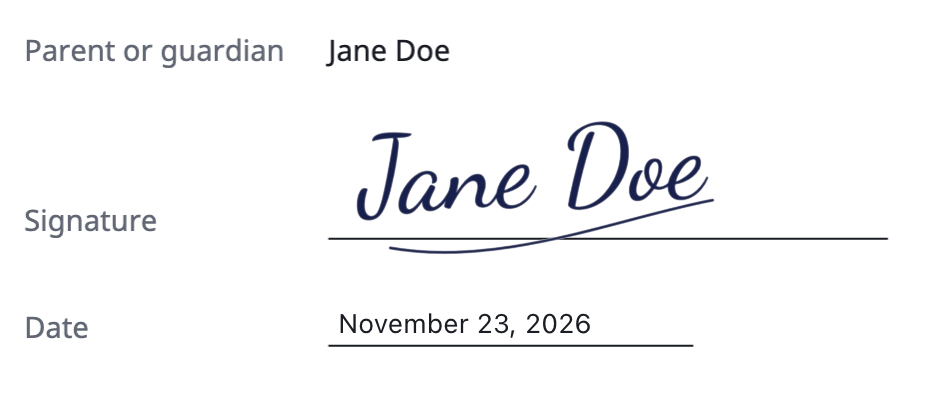
Both files are the same consent form. The second was signed in PDF Stitch with a picture made to look like a phone's photo of a signature on slightly grey paper, then dated. Under each page is the text the file holds, read out of it.
Unsigned
A consent form with an empty signature line and date line, as it would arrive by email.
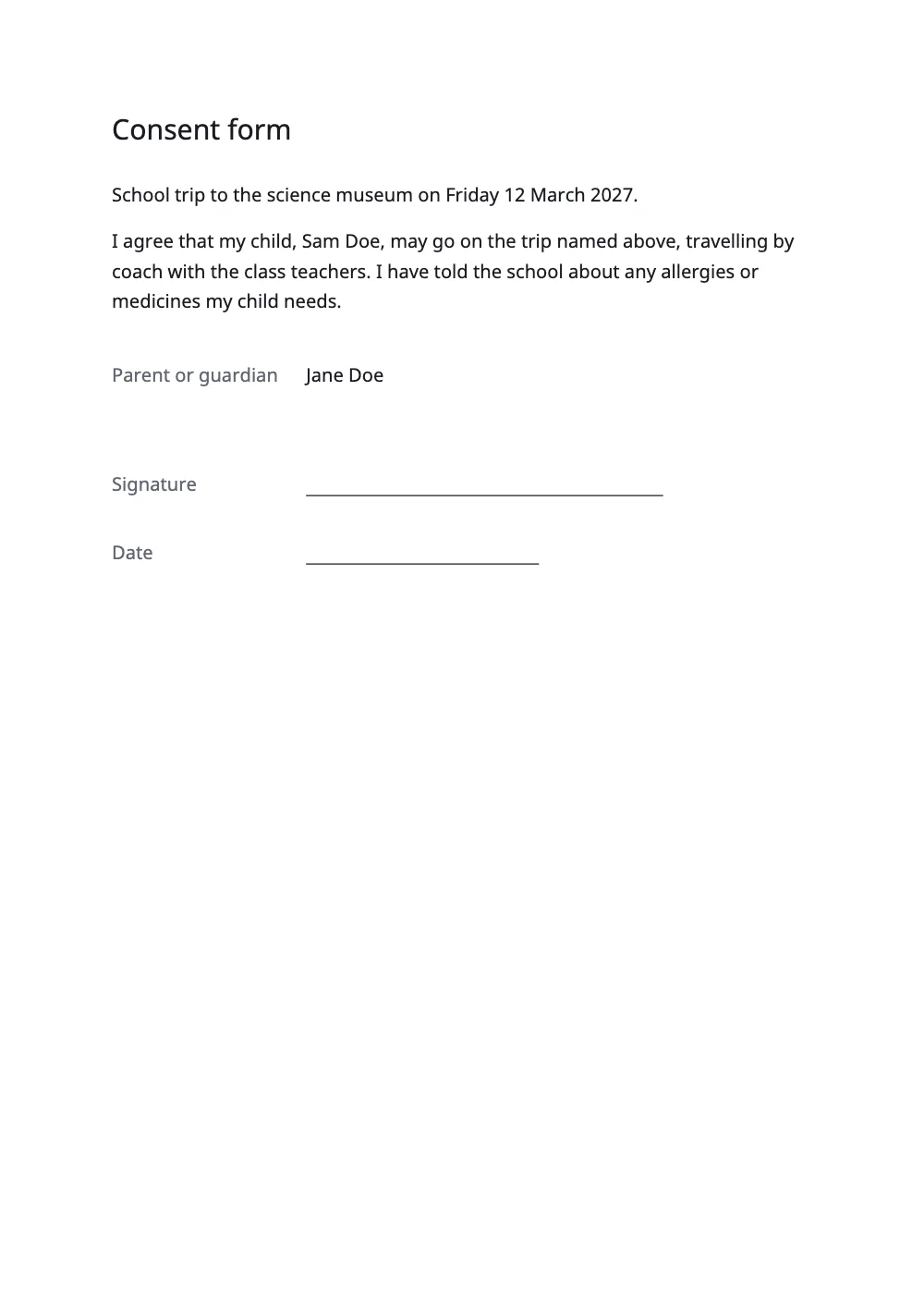
Try it: drag across the words on the page, or select all its text, then copy it. What you can copy is what the file holds.
The text in "Unsigned"
Consent form
School trip to the science museum on Friday 12 March 2027.
I agree that my child, Sam Doe, may go on the trip named above, travelling by
coach with the class teachers. I have told the school about any allergies or
medicines my child needs.
Parent or guardian Jane Doe
Signature
Date
Signed with PDF Stitch
The same form signed in PDF Stitch with a picture made to look like a photo of a signature on paper, then dated, both made part of the page. The text it holds is the same as the unsigned form's: the signature and the date are pictures on the page, not words in the file.
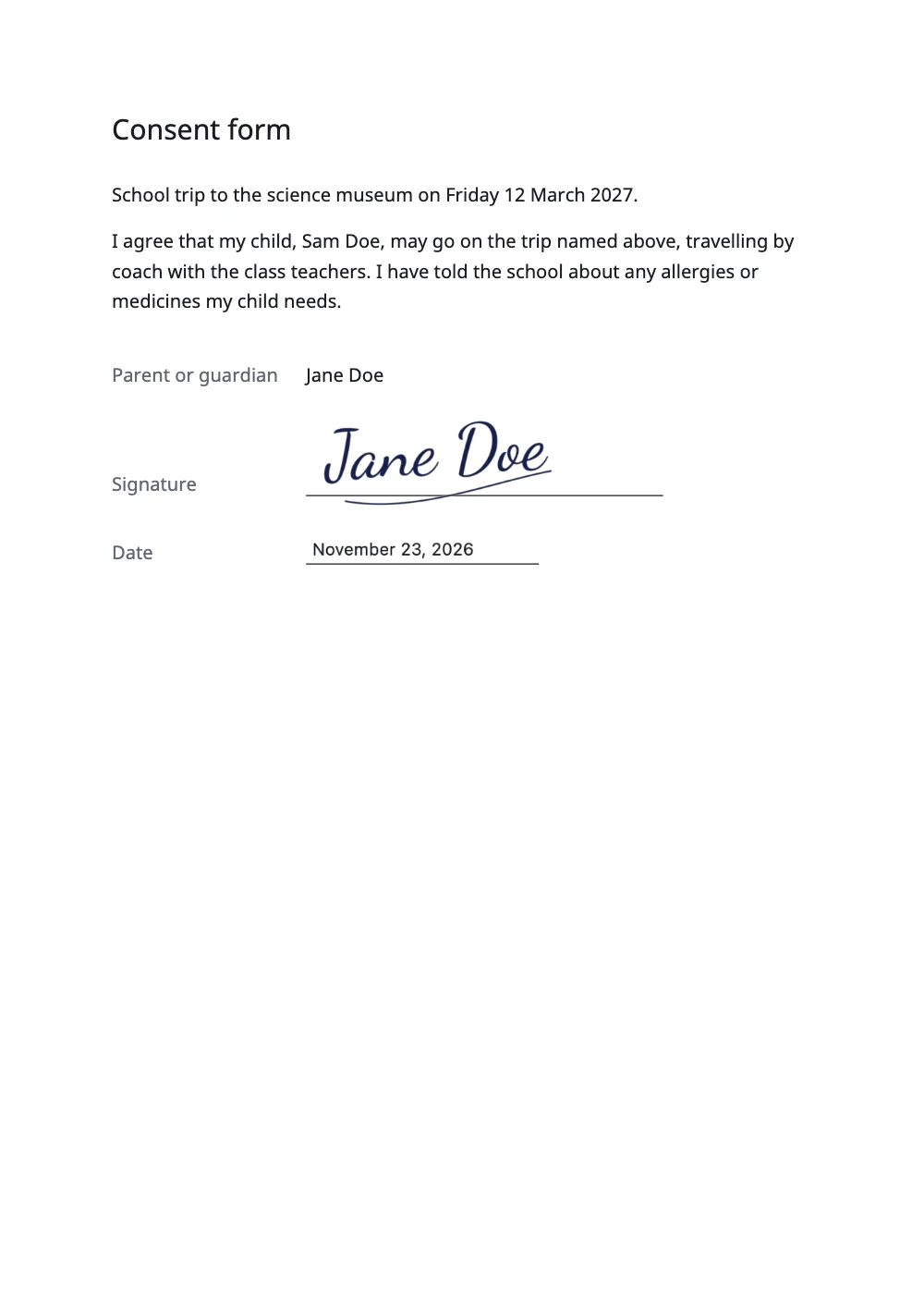
Try it: drag across the words on the page, or select all its text, then copy it. What you can copy is what the file holds.
The text in "Signed with PDF Stitch"
Consent form
School trip to the science museum on Friday 12 March 2027.
I agree that my child, Sam Doe, may go on the trip named above, travelling by
coach with the class teachers. I have told the school about any allergies or
medicines my child needs.
Parent or guardian Jane Doe
Signature
Date
- Look at the signature: no grey paper around it, no edge of a photo. Only the ink came onto the page.
- Try to select the signature or the date in the signed form. They are pictures, so there is nothing to select, and the text under each page is the same in both files.
- Open the signed form in PDF Stitch: the signature and the date are part of the page, and cannot be picked up and moved.
How to sign with a photo of your signature
First, the photo. Sign a sheet of plain white paper with a dark pen, black or blue, a little larger than you usually would. Lay it flat in daylight or under a bright lamp, with no shadow across it, and photograph it from straight above, close enough that the signature fills most of the photo. A seal is done the same way: press it firmly on white paper and photograph the impression.
Then, in PDF Stitch:
- Open your PDF in PDF Stitch and double-click the page with the signature line to open it large.
- Choose the Signature tool (S) and click on the signature line.
- Choose From a picture, press Choose a picture… and pick your photo. Take out the paper is on from the start, so only the ink is left. Press Place it.
- Drag the signature so it sits on the line, and drag its corner to make it the size of a signature on paper.
- Choose the Date tool (D) and click just above the start of the date line, where the top of the date should go: today's date is written there. Click outside it to put it in place, then press the smallest of the three dots, Thin, small text, to make it about the size of the form's text.
- To fix the date into the page as the signature is, press Back to all pages, open More ways to export (the arrow next to Download) and choose Document properties. Open The downloaded file, turn on Make drawings part of the page and press Save.
- Press Download.
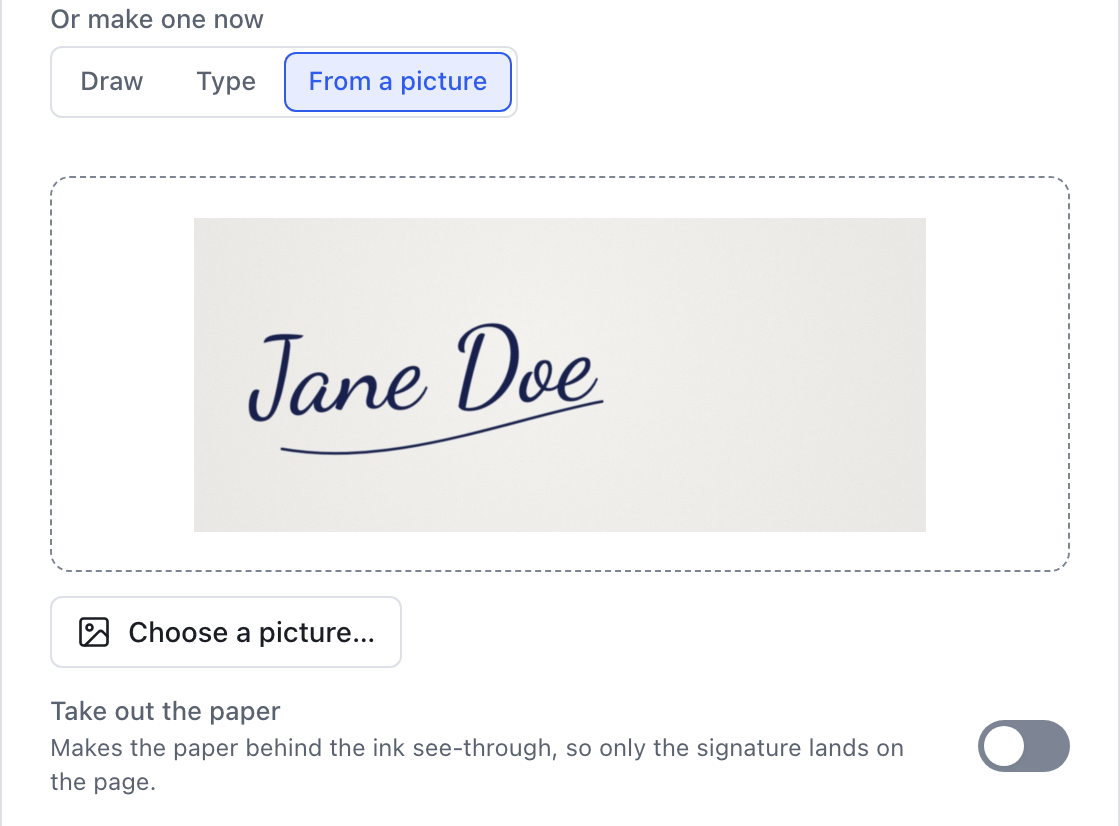
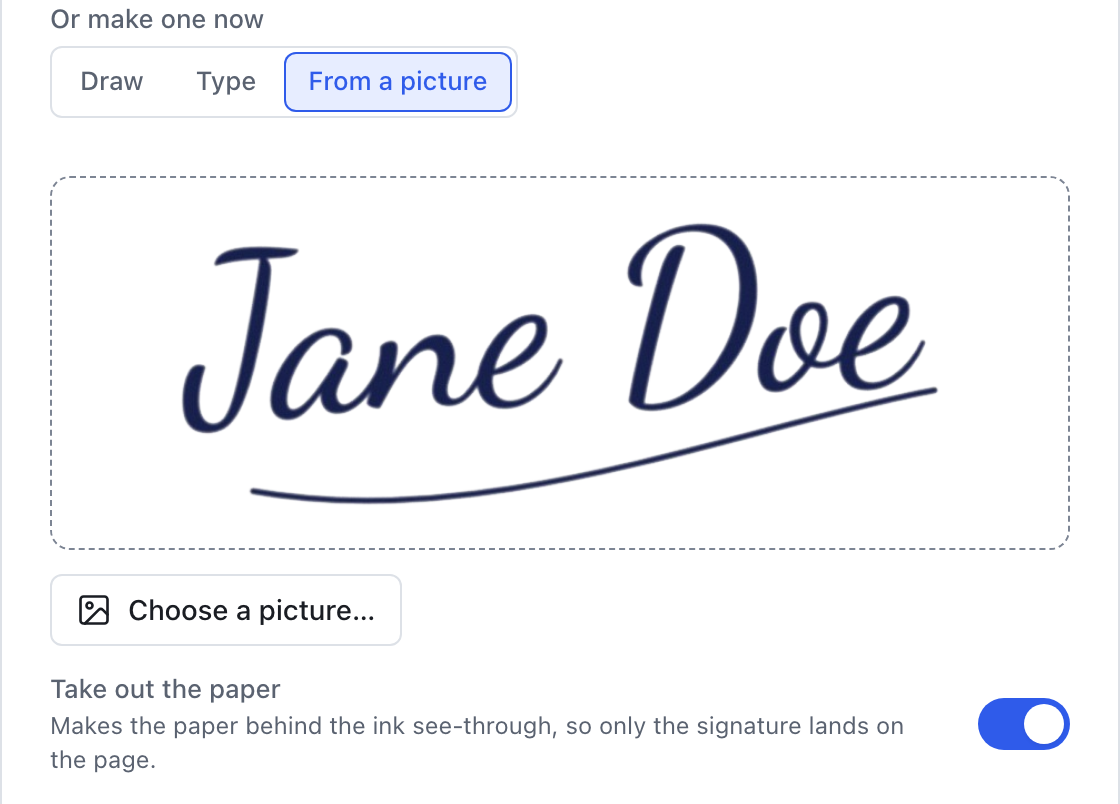
Your signature is kept for the next page or the next form: when you click with the Signature tool again, it is offered under Use one you made before, so you choose it there instead of the photo. It is remembered until you close or reload the tab, or in this browser if you turn on Keep my files in this browser on the app's first screen, and is never uploaded.
A photo that comes out clean
Take out the paper goes by how light each point of the photo is. Points lighter than a set level, as white paper is, become fully see-through. Points darker than another level, as ink is, stay as solid as they were, in their own colour. Points between the two fade, which keeps the edges of the strokes smooth. Then the picture is cut down to what is left. So:
- Light is what matters most. White paper in a dim room photographs grey. Paper that comes out darker than a very light grey is not light enough to go, and stays as a faint haze around the signature. Take the photo again in brighter light, or by a window.
- A shadow stays. A shadow of your phone or hand across the paper is darker than the paper around it, so part of it stays. Since the picture is cut down to everything left, a shadow in a corner also makes the picture far larger than the signature.
- Dark ink comes out best. A black or blue pen stays solid. A pencil or a pale felt tip may be light enough in places to fade.
- Colours stay. Nothing is turned black: blue ink stays blue, and a red seal stays red.
- Crop the photo if you can. Anything else on the desk next to the paper is not white, and stays.
A seal (hanko) or a company stamp. Press it firmly on white paper with a well inked pad, photograph it, and choose it under From a picture as you would a signature. A firm impression in red is dark enough to stay solid, and the paper around it and in its gaps goes. A pale, patchy impression fades with the paper: press it again.
What the signed file holds, and what it does not
The signature is drawn into the page itself, as a picture, not left as a comment that another PDF app could move or delete. Anyone who opens the file sees it where you placed it.
The date is different. The Date tool writes text, which is saved as a comment that other PDF apps can change, move or delete, unless Make drawings part of the page is on in Document properties. Then it is drawn into the page too, as the signed sample is.
Compare the text under the two samples: it is the same. Nothing in the signed file proves who signed, or when: the date on the page is a picture of a date, and the time a file records it was saved can be changed like anything else in it. A picture of a signature shows that the page was signed, as a signed printout that was scanned does, but cannot prove who placed it there or that nothing in the file changed afterwards. And anyone who has the picture can put it on another document, so keep the photo of your signature to yourself.
A digital signature made with a certificate is the other kind. It is not a picture: it is data in the file that shows which certificate signed it and that nothing has changed since. PDF Stitch adds one when you choose Download signed with a certificate under More ways to export beside Download (Pro). It needs a certificate file of your own.
Does a picture of a signature count?
That depends on the law that applies and on what the document needs. What a few laws say:
- The European Union. The eIDAS Regulation defines an electronic signature as data in electronic form, attached to or logically associated with other data in electronic form, that the signatory uses to sign. A picture of your signature placed on a PDF is that plainest kind, often called a simple electronic signature; eIDAS also names advanced and qualified ones. Its Article 25(1) says an electronic signature may not be denied legal effect, or refused as evidence in court, only because it is electronic or is not a qualified one. Article 25(2) says a qualified electronic signature has the equivalent legal effect of a handwritten one; the Regulation makes that promise for no other kind. The United Kingdom kept both rules in its own version after leaving the EU.
- Germany, where a law asks for written form. The German Civil Code (§ 126 BGB) then requires the document to be signed by the issuer's own hand. Unless a law says otherwise, electronic form may take its place, and electronic form needs a qualified electronic signature (§ 126a). For some documents even that is excluded: notice ending a job, or an agreement to end it, must be in written form, and electronic form is not allowed (§ 623 BGB). A picture of a signature does not do for these.
- The United States. The federal E-SIGN Act says a signature or contract in a transaction in or affecting interstate or foreign commerce may not be denied legal effect only because it is in electronic form, and counts as an electronic signature any electronic sound, symbol or process attached to or logically associated with a record and adopted by a person with the intent to sign it. It does not require a private person or business to accept electronic signatures, and it does not apply to wills, adoption, divorce and other family law, court documents, or some notices, such as of eviction or of cutting off water, heat or power.
- Japan. A Q&A on seals issued by the Cabinet Office, the Ministry of Justice and the Ministry of Economy, Trade and Industry on 19 June 2020 says that under private law a contract is made by the parties' agreement, and that, unless a specific rule says otherwise, neither a written document nor a seal on it is required: a contract without a seal is just as effective. A seal the person pressed makes a document easier to prove in court, as the Code of Civil Procedure (Article 228(4)) presumes a private document with the person's signature or seal to be genuine, though the Q&A calls that effect limited; without a seal, a document can be proved by other evidence. The Q&A does not speak of a picture of a seal placed in a PDF. Among the ways it suggests to make a document easier to prove are keeping the emails it was agreed in, with their dates.
Many everyday forms, letters and agreements are signed this way. It is not enough where a law asks for a handwritten or a qualified electronic signature, as German law does for written form, or where the other side asks for one of those or for ink on paper. When you are unsure what a document needs, ask whoever asked you to sign it, or a lawyer. Whatever you sign, keep a copy of the signed file and the email you sent it with.
You do not have to take our word for it
-
Watch the network
The "Nothing is uploaded" button in the app opens a list of every other site the page has contacted since you opened it, and how often, taken from the browser's own record. Your browser's developer tools show every request, this site's own included.
-
Pull the plug
Once the app has loaded, turn off your network and keep working. Text recognition, the document converter and the handwriting fonts work offline too after their first use.
-
Redaction that removes
A page with something blacked out is saved as a picture of itself, so the text under the box is gone, and every redacted page is checked before the file is saved.
Questions
- Is signing with a photo of my signature free?
- Yes. The Signature tool, taking the paper out of a photo, the Date tool and Make drawings part of the page are free. Download signed with a certificate, which adds a digital signature made with your own certificate, is Pro.
- Is my signature or my photo uploaded?
- No. PDF Stitch runs in your browser, and neither the photo nor the file is uploaded. The signature is remembered until you close or reload the tab, or kept in this browser if you turn on Keep my files in this browser.
- Why is there a grey haze or a grey box around my signature?
- The paper in the photo was not light enough to be taken out, usually because the light was dim or a shadow fell across it. Take the photo again in brighter light, with nothing casting a shadow, and crop it close to the signature.
- Can I use my hanko, or a company stamp?
- Yes. Stamp it firmly on white paper, photograph it, and choose the photo under From a picture. A firm impression stays red and solid, and the paper goes. Whether a picture of a seal is accepted is up to the law that applies and to whoever asked for it.
- Can I sign several pages, or initial each one?
- Yes. The signatures you made last are offered under Use one you made before the next time you click with the Signature tool. To initial pages, photograph your initials on paper the same way, or type them under Type with Initials.
- Can someone take my signature out of the signed PDF?
- Yes. It is a picture on the page, and anyone with the file can copy it, as they could from a signed scan. That is true of any signature placed as a picture, in any app.
- Is it legally binding?
- Under the EU's eIDAS rules it is an electronic signature, the plainest kind, often called a simple one, and many everyday agreements are made this way. Some documents need a form the law sets, up to a signature in ink on paper, and when you are unsure what a document needs, ask a lawyer.
Sources
- Regulation (EU) No 910/2014 (eIDAS), Article 25, legal effects of electronic signatures, as adopted (legislation.gov.uk)
- eIDAS, Article 3, definitions (10) to (12) of electronic, advanced and qualified electronic signatures (legislation.gov.uk)
- Regulation (EU) 2024/1183, which amends eIDAS and deletes only paragraph 3 of Article 25 (EUR-Lex)
- eIDAS Article 25 as kept in UK law (legislation.gov.uk)
- German Civil Code § 126, written form
- German Civil Code § 126a, electronic form
- German Civil Code § 623, written form of notice ending employment
- US Code, 15 U.S.C. § 7001, general rule of validity (E-SIGN Act)
- US Code, 15 U.S.C. § 7003, exceptions
- US Code, 15 U.S.C. § 7006, definitions
- Cabinet Office, Ministry of Justice and Ministry of Economy, Trade and Industry: 押印についてのQ&A, Q&A on seals (19 June 2020)